

Automation doesn’t remove operational judgment; it assigns repeatable work to defined workflows while people manage exceptions and decisions. IT operations automation services use software, scripts, and, where appropriate, AI to execute tasks such as account provisioning, password resets, support-request routing, and system monitoring. The goal is consistent execution, with clear controls for reviewing outcomes and escalating issues.
Routine tasks can consume valuable team capacity, making automation an appealing efficiency measure. The challenge is designing workflows that fit an enterprise’s systems, security requirements, and operating procedures without turning visible manual work into harder-to-detect errors.
This article explains what IT automation can do, which enterprise tasks it can handle, and how human oversight works when a workflow encounters an exception. It also covers AI and hyperautomation, then outlines how teams can design and introduce automation in a controlled way, starting with repeatable processes suited to structured execution.
Key Takeaways
- Identify repetitive workflows across business functions, then assess how system complexity and configuration risks affect automation design.
- Connect automated actions to monitoring and service management so events can be tracked, routed, and handled through established processes.
- Document and standardize workflows before automating them, with clear override options and escalation paths for exceptions.
- Use AI and hyperautomation to coordinate suitable tasks while preserving human review where judgment or context is required.
- Transition in a controlled way by starting with repeatable, lower-risk processes and testing them before broader deployment.
Why is IT process automation challenging for enterprises?
Enterprise process automation coordinates work across systems, teams, and controls, so a workflow can affect multiple departments. The goal is to reduce manual effort without introducing errors or weakening oversight.
Business Process Automation and RPA
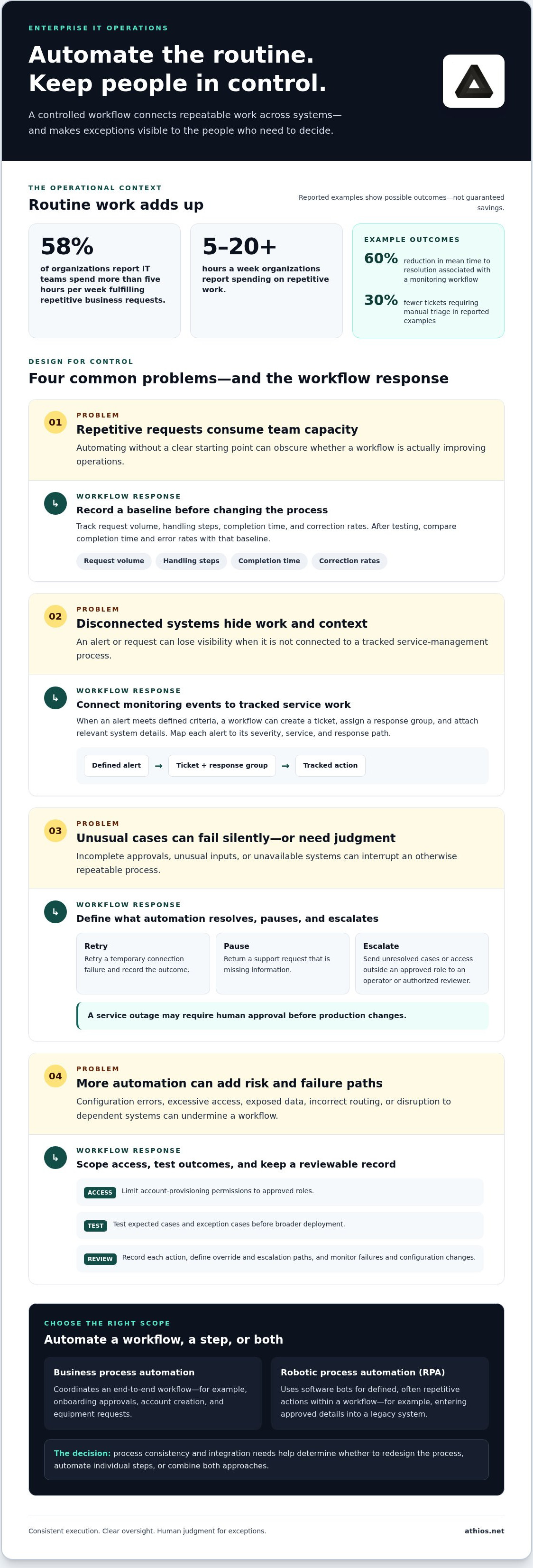
Business process automation coordinates an end-to-end workflow, while robotic process automation (RPA) uses software bots to perform defined, often repetitive actions within it. For example, employee onboarding may coordinate approvals, account creation, and equipment requests, while an RPA bot enters approved details into a legacy system. This distinction helps an enterprise determine whether to redesign a process, automate individual steps, or combine both approaches. The right choice depends on process consistency and integration needs.
Enterprise Workflows and Automatable IT Processes
Enterprise workflow automation connects repeatable tasks across teams and systems instead of automating an isolated action. IT operations teams can automate employee onboarding, password resets, and support requests. A workflow might validate an access request, route it for approval, and provision an account after authorization. Monitoring can also generate a service-management ticket when an alert meets defined criteria. These connected processes can streamline execution while preserving review and escalation points.
Manual repetitive work remains a substantial operational burden: 58% of organizations report that IT teams spend more than five hours per week fulfilling repetitive business requests. Organizations report spending between 5 to 20+ hours a week on repetitive work. These figures describe time committed to requests, not guaranteed savings from automation. Teams can establish a baseline by recording request volume, handling steps, completion time, and correction rates before changing a workflow.
The benefits include reducing repetitive handling and creating more consistent execution; drawbacks include setup complexity and new failure paths. AusIMM notes that adding automated components can introduce errors, including configuration errors. Teams should test each workflow against expected and exception cases, then compare completion time and error rates with the recorded baseline.
Security, compliance, and operational risks include excessive access, incorrect routing, exposed data, and changes that disrupt dependent systems. An account-provisioning workflow, for example, should limit permissions to approved roles and create a reviewable record of each action. Define override and escalation paths, and monitor failures and configuration changes as part of ongoing operations.
IT Operations Automation Costs
The cost of IT operations automation services in the United States depends on workflow complexity, system integration, security controls, and maintenance needs. Pricing is based on the project and provided after a quote request. Key factors include the number of systems involved, process variability, and testing requirements. A straightforward, stable password-reset workflow differs from a multi-system onboarding process with approvals and exception handling. Scoping these elements helps align investment with operational priorities.
What types of tasks can be automated using IT process automation tools?
Automation can coordinate service requests, infrastructure actions, and software delivery across enterprise systems. The strongest candidates have defined inputs, repeatable rules, and a clear path for exceptions.
Monitoring and Service Management Integration
Monitoring integration connects system events to service-management actions, helping teams turn alerts into tracked work. For example, an alert that meets a defined threshold can create a ticket, assign a response group, and attach relevant system details. An example monitoring and alerting workflow is associated with a 60% reduction in mean time to resolution. Automated ticket management examples report 30% fewer tickets requiring manual triage.
Teams can map each alert to a severity, service, and response path. A machine-generated event should not trigger every corrective action automatically: a service outage may require human approval before production changes. Linking alert records with ticket history also helps operators spot recurring incidents and refine thresholds.
Managed Automation and Exception Handling
Managed automation combines routine execution with operational oversight, ensuring exceptions reach the right team rather than failing silently. A workflow can retry a temporary connection failure, record the outcome, and escalate an unresolved case to an operator. This matters because unusual inputs, unavailable systems, or incomplete approvals can interrupt otherwise stable processes.
Exception rules should define what automation can resolve, when it should pause, and who receives an escalation. A support request missing information, for example, can be returned to the requester, while an access request outside an approved role can go to an authorized reviewer. Clear ownership reduces duplicated effort and keeps decisions visible.
Cloud and Infrastructure Management
Cloud and infrastructure automation applies approved configurations and operational policies across computing, network, and storage environments. Teams can use it to provision a development environment, apply a standard configuration, or identify resources that have drifted from an approved state. These workflows can reduce manual effort, but their scope should reflect system dependencies and the impact of each change.
A deployment workflow, for example, can verify required settings before making a change, then log the result for operations review. Organizations with hybrid environments need integration across cloud and on-premises systems, along with consistent access controls and escalation procedures. Architecture and infrastructure planning helps determine how these environments connect before teams automate changes.
Configuration Management and CI/CD
Configuration management maintains defined system settings, while continuous integration and continuous delivery (CI/CD) automate software build, test, and release stages. A pipeline can run checks when code changes, package approved updates, and pause deployment if a test fails. Consistent steps make releases easier to review and help teams identify where a failure occurred.
Teams should separate routine validation from decisions that carry operational risk. For instance, automated tests can flag a failed security or quality check, while a designated reviewer authorizes a production release. Organizations assessing automation and infrastructure planning can align workflow design with the systems and controls those processes must support.
Self-service portals extend these patterns to common employee needs, such as submitting a request, checking its status, or starting an approved workflow. A structured request form can collect the information needed for routing before work enters a service queue. This can help manage demand without removing review, access controls, or human handling for exceptions.
Which work is automated, and who handles exceptions?
Automation works best when a workflow has defined inputs, repeatable decisions, and a clear owner. Document and standardize the process before assigning routine steps to software.
Workflow Documentation and Standardization
Workflow documentation records each task, decision, system, and handoff before automation begins. Standardization matters because software follows explicit rules, not informal assumptions held by individual employees. An access-request workflow, for example, should specify required approvals, role criteria, and what happens when information is incomplete.
Map the current process, resolve unnecessary variations, and document the approved version. Assign an owner to maintain workflow rules as systems or responsibilities change. Without these steps, automation can reproduce inconsistent practices across an organization, making errors harder to trace and correct.
Workflow Orchestration and Chatbots
Workflow orchestration coordinates tasks across software, teams, and decision points so actions happen in the right sequence. A service chatbot, for example, can collect a user’s issue, identify the request category, and create a support case with the supplied details. This can speed up intake while preserving a human response for complex cases.
Define the chatbot’s boundaries before deployment. It can answer approved questions or start a standard request, then route ambiguous language, sensitive access requests, or unresolved cases to an employee. Clear handoff criteria prevent a conversational interface from appearing to resolve work that still needs an operator’s judgment.
End-to-End Workflow Automation
End-to-end workflow automation connects a process from its initial request through completion, including handoffs between systems and teams. In employee onboarding, for example, an approved request can trigger account setup, role-based access tasks, and notifications to responsible teams. Connecting these stages helps reveal where work stalls or information is entered repeatedly.
Identify the process owner and each system boundary before connecting workflow steps. Then define which actions run automatically, which require approval, and how incomplete tasks are tracked. This gives operators a clear path to intervene when a dependency fails, rather than leaving unfinished work without an owner.
Workflow Automation
Workflow automation uses software to carry out defined tasks or decisions according to documented rules. Suitable examples include routing standard support cases, running quality checks, and validating required fields before a request advances. Automating quality assurance (QA) checks can help apply the same criteria consistently, provided staff can review those criteria.
Human oversight remains essential for exceptions, overrides, and decisions outside the workflow’s rules. Specify an escalation path, assign responsibility, and record why an operator intervened. A failed quality check, for instance, can pause a release and route the issue to its designated reviewer. These controls keep automated execution accountable as workflows evolve.
Artificial intelligence and hyperautomation
Artificial intelligence can support automation when workflows involve pattern recognition or language processing. Hyperautomation combines technologies and processes to coordinate broader operational work.
AI and Machine Learning in IT Operations
Artificial intelligence applies techniques such as machine learning to tasks involving data interpretation, pattern identification, or information classification. A model can, for example, group incoming incident descriptions by likely category to help a service team prioritize review. Its output informs a workflow but does not replace the organization’s rules for authorization, escalation, or resolution.
Machine learning depends on relevant data and ongoing evaluation. Define which inputs a model can use, what actions it may trigger, and when a person must review the result. For a security alert, AI may help organize signals for investigation, while an analyst assesses the context before approving a consequential response. This preserves human judgment when ambiguity matters.
Hyperautomation Across the Enterprise
Hyperautomation extends beyond one bot or script by coordinating automation tools, analytics, and business processes across an enterprise. Gartner projected that 65% of large organizations worldwide would have deployed some form of hyperautomation by 2024. The concept matters because a connected approach can address workflows spanning infrastructure, service management, and software delivery, rather than optimizing a single isolated task.
An incident workflow could, for example, correlate monitoring signals, classify a service request, and assemble diagnostic information for an operator. Define ownership, access boundaries, and a way to stop or redirect execution for each component. Monitoring outcomes helps teams catch inaccurate classifications or changing conditions before automated decisions become routine.
NoOps and Human Oversight
NoOps aims to automate tasks that can be automated, giving teams more time for software development lifecycle work and less routine effort. It does not permanently remove operational responsibility. A cloud environment may technically support NoOps, but changing systems and operational needs can make that state short-lived.
NoOps does not address evolving data regulations, new technology needs, or IT service management on its own. Teams still need people to manage those areas, review exceptions, and maintain the infrastructure supporting automated workflows. Automation can reduce repetitive intervention while operational owners continue to manage policy changes, service incidents, and decisions that require context.
Measured examples illustrate possible outcomes without making them universal targets. A BASF division saved 2,400 hours over one year after implementing automation features. An example automated compliance-reporting process cuts audit preparation time by 75%. Such results depend on the workflows involved; teams should define their own baseline and evaluate whether automation improves process performance without weakening oversight.
Automation solution design and transition
A sound transition to automation begins with process selection, not tool selection. Start with a simple, repeatable workflow, test it in a controlled environment, and expand only after reviewing its behavior. This sequence can streamline routine work while limiting disruption to dependent systems and services.
Process selection determines whether automation removes avoidable handling or merely transfers it to another platform. Map the workflow from request to completion, including inputs, decisions, system handoffs, approvals, and exceptions. A standard password-reset request may have stable steps, while a production incident involves changing conditions and greater operational risk. The password-reset process is the more suitable starting point.
Before implementation, define the intended outcome and how to assess it. A support-request workflow could be measured by completion time, routing accuracy, unresolved cases, and operator interventions. Record the current process as a baseline, then compare it with results from a controlled test. This shows whether automation reduces manual effort or creates extra work through retries and corrections.
Test ordinary inputs and failure conditions. In a test environment, simulate missing information, unavailable systems, incorrect permissions, and duplicate requests. Confirm that the workflow pauses safely, records what happened, and directs the case to an assigned operator. Testing these conditions before production rollout can reveal configuration errors without exposing live services to the same failures.
Build security and compliance into the design rather than adding them later. Define which identities and systems the workflow can access, what information it processes, and which actions need human approval. An automation, for example, can prepare a change request but wait for an authorized reviewer before applying a production configuration. This boundary supports controlled execution and accountability for consequential decisions.
Transition planning also requires a rollback and ownership model. Assign an operational owner, document how to disable or reverse the workflow, and establish where exceptions are reviewed. During rollout, compare automated outcomes with the documented process and investigate unexpected differences before expanding the scope. A staged release lets teams learn from one workflow before applying the pattern to other platforms.
Scalability depends on repeatable design, consistent monitoring, and clear responsibility for changes. A process that works in one system may need revised integrations, access rules, or exception paths elsewhere. Treat each expansion as a controlled change, validating its dependencies and operational impact rather than copying settings without review. This can extend automation without multiplying hidden failure points.
For a structured transition, plan an enterprise automation approach around workflow design, platform integration, and operational controls.
Athios: Enterprise Automation & Custom AI Solutions
Athios helps organizations design enterprise automation and custom AI solutions for operational workflows requiring connected systems, defined controls, and human oversight. Consider this work when a process spans platforms, requires custom integration, or needs a structured shift from manual execution. Architecture, networks, and infrastructure planning can support automation design when system dependencies shape the workflow. System and network administration can also support the operational environment in which automated processes run. The appropriate scope depends on the workflow, infrastructure, and oversight requirements. Contact Athios to discuss an automation project.
Make the Next Automation Decision Deliberate
Start by selecting a process with clear ownership and an intended outcome, then determine how it should adapt as systems and organizational needs change. Effective IT operations automation services treat automation as an operational capability to govern over time, not a one-time deployment. This approach helps teams align process design, technical architecture, and workforce responsibilities as priorities shift.
Athios combines Enterprise Automation & Custom AI Solutions with Architecture, Networks, and Infrastructure Planning. Its Website and Mobile Application Development offering can also support organizations building or improving the digital interfaces people use to initiate and manage workflows. These capabilities are relevant when automation depends on connected systems, tailored software, or a coherent user experience.
Define the operational outcome and the decision owners before setting the next project in motion. Then connect the scope to the systems and people responsible for sustaining it. Contact Athios to discuss automation and identify a suitable path forward for your organization.
Frequently Asked Questions
What is IT automation?
IT automation uses software to perform defined technology tasks with limited manual intervention. A scheduled script, for example, can verify that required files exist before a routine data transfer begins. The workflow follows specified conditions and records its outcome for review. Automation is most useful when a task has predictable inputs and an observable result, while responsible staff retain decisions involving context or unusual circumstances.
Can automation work across legacy systems with limited connectivity?
Yes, some legacy systems can work with automation through controlled methods such as scheduled file exchanges, existing command-line tools, or an intermediary integration layer. A system without a modern interface might export a report to a monitored location for another process to validate. Design for connection interruptions, data-format changes, access boundaries, and processing delays, with a clear route for failures requiring operator review.
How do BPA, RPA and AI fit together?
Business process automation (BPA) organizes the broader process, robotic process automation (RPA) performs rule-based actions, and artificial intelligence (AI) helps interpret or classify information. In an IT change process, BPA can define approvals, an RPA bot can enter approved details into an older application, and AI can categorize incoming change descriptions for staff review. Give each component a distinct role so model suggestions do not become authorization decisions without review.
Is NoOps the future of IT operations?
NoOps is best understood as an aspiration to automate suitable operational tasks, not a universal endpoint for IT teams. Organizations still need people to maintain platforms, assess changing requirements, and govern service management. An automated deployment, for example, can complete routine checks while engineers handle a failed dependency or a change with broader impact. The practical goal is to direct skilled attention to work that requires technical judgment.
What are IT operations automation services?
IT operations automation services help organizations design or implement automated workflows for technology operations. The work can include defining process rules, connecting systems, developing custom automation, and establishing operational oversight. For an enterprise with a manual approval process spanning several applications, an engagement may focus on mapping the workflow and implementing suitable integrations. Athios provides Enterprise Automation & Custom AI Solutions for organizations addressing these needs.
What IT operations tasks can be automated?
Tasks with consistent rules and clear outcomes are common automation candidates. Examples include validating backup completion, checking whether a system configuration matches an approved baseline, and notifying an owner when a scheduled job fails. Teams can also automate routine software quality checks. Before automating, identify the task’s input, expected result, permitted actions, and failure owner. This helps distinguish reliable execution from cases requiring human judgment.
How do you implement IT operations automation step by step?
Begin with a repeatable process and document its current inputs, decisions, dependencies, and owners. Define the desired outcome and baseline, then design the workflow, access controls, exception route, and rollback approach. Test ordinary and failure cases in a controlled environment before deployment. After release, review execution records and operational feedback, address defects, and expand only when the workflow remains manageable within its intended scope.
How do IT operations automation services integrate with existing systems?
Integration connects an automation workflow with existing applications through available interfaces, connectors, scheduled exchanges, or event messages. For example, an approved change record can update a configuration database while preserving a traceable reference to the authorization. Design choices depend on each system’s data format, access model, and connection method. Define how errors are logged and reconciled so failed exchanges do not leave records inconsistent across platforms.

Article by
Kevin Torres


