

Could a system that closes a critical workflow gap also create new security, integration, and support obligations? That is the central question behind custom web application development. Off-the-shelf tools can work well when workflows are standard, but they may not support essential processes, enterprise systems, or operating constraints. A bespoke application is not automatically the better choice. Its value depends on whether its capabilities justify the work required to build and maintain it.
This guide provides a practical way to assess that decision. You’ll learn how to compare bespoke development with existing software, define requirements before scope hardens, and evaluate architecture, security, integrations, usability, scalability, and maintenance together. It also explains how delivery responsibilities and engagement structure can affect project risk.
A successful application is designed around the work it supports, not simply as a collection of screens and features. We’ll examine how enterprise and public-sector objectives shape technical and delivery decisions, from discovery and deployment through cybersecurity sustainment. Athios develops web applications and provides UI/UX, architecture, infrastructure, and security services to help organizations align software decisions with long-term operating needs.
Key Takeaways
- Consider custom web application development when essential workflows or integrations cannot be adequately supported by existing software.
- Assess architecture against user roles, expected workloads, data sensitivity, availability needs, and connections to enterprise systems.
- Compare off-the-shelf, low-code, bespoke, and hybrid approaches by fit, control, customization, ownership, and maintenance demands.
- Set observable acceptance criteria across discovery, design, implementation, testing, deployment, and sustainment to reduce scope ambiguity.
- Align application development with UI/UX, architecture, and cybersecurity requirements for commercial or federal operating environments.
When Does Custom Web Application Development Make Sense for an Organization?
A custom web application is browser-accessible software designed around an organization’s requirements. It supports defined tasks, users, and information through a web browser, with functions shaped by the organization’s workflows rather than limited to general-purpose features.
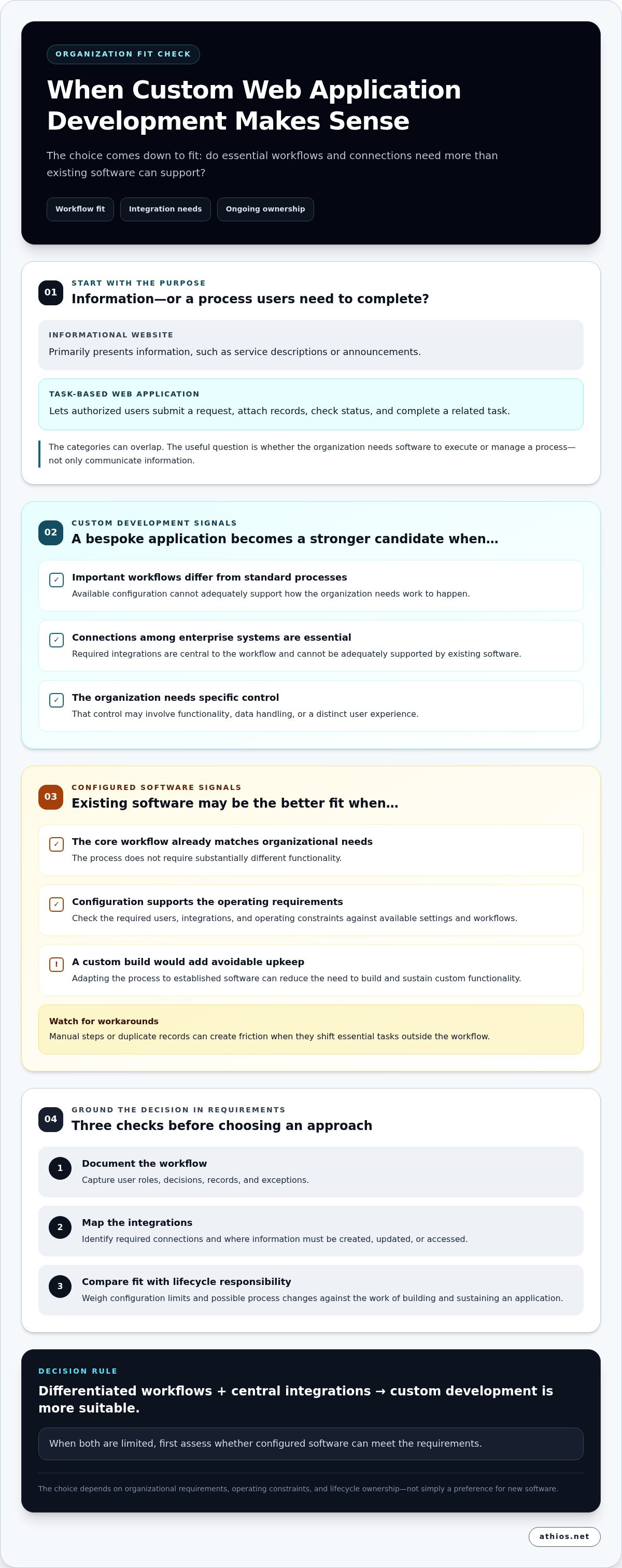
A public-facing website primarily presents information, such as service descriptions or announcements, although it may also include interactive functions. A web application enables users to complete tasks, manage records, or move a process forward. Configured commercial software, by contrast, provides established functions that an organization sets up through available settings and workflows. These categories can overlap, but identifying the primary purpose helps clarify the decision. The overview What is a Web Application? offers background on how browser-based applications operate.
What distinguishes a custom web application from a website?
The practical distinction is what the user can do. An informational site may explain how to submit a request, while an application can let an authorized user submit it, attach records, check its status, and complete a related task. An internal workflow tool might route requests to different roles, preserve decision history, and display information according to access permissions. A customer self-service portal could provide a similar task-based experience for external users.
These are not strict boundaries. Websites can include interactive features, and applications can contain informational pages. The useful question is whether the organization needs software to execute or manage a process, rather than only communicate information.
When is custom development preferable to configuring existing software?
Custom web application development becomes a stronger candidate when important workflows differ significantly from standard processes, or when available configuration cannot support the required connections among enterprise systems. The case also strengthens when the organization needs control over specific functionality, data handling, or a distinct user experience. Assess each requirement against the effort to implement it and the ongoing responsibility of maintaining the application.
Existing commercial software may be a better fit when its core workflow already matches organizational needs and its configuration supports the required users, integrations, and operating constraints. Adapting a process to established software can reduce the need to build and sustain custom functionality. However, workarounds can create friction when they shift essential tasks into manual steps or require users to maintain duplicate records.
Decision rule: Custom development is more suitable when workflows are meaningfully differentiated and integrations are central to the process. When both are limited, first assess whether configured software can meet the requirements.
- Document the workflow, including user roles, decisions, records, and exceptions.
- Map required integrations and identify where information must be created, updated, or accessed.
- Compare configuration limits and possible process changes with the responsibility of building and sustaining an application.
The decision depends on organizational requirements, operating constraints, and lifecycle ownership, not a preference for new software. Assessing these factors together creates a sound basis for choosing an existing platform, a custom application, or a combination of both.
How Architecture, Security, and Integrations Shape a Custom Web Application
Architecture should follow operational requirements, not precede them. User roles, expected workloads, data sensitivity, and availability needs shape decisions about where functions run, how information is stored, and which components require protection. A tool used by a small internal team has different workload assumptions from a portal serving customers across multiple locations. Both need clear access boundaries and a plan for service interruptions.
Architecture decisions connect security, integrations, and long-term operability. Design them together, because a change in one can affect the others. For custom web application development, define how users and systems interact before selecting components, then revisit those decisions as requirements evolve.
How should architecture account for integrations and future change?
Start with an inventory of user groups, existing systems, data sources, identity services, and integration dependencies. Map what information each system creates, reads, or updates. Identify where delays, errors, or duplicate records could disrupt work. This map clarifies system boundaries before an implementation approach is selected.
API-based integration can connect systems through defined interfaces, but it is one pattern, not a universal requirement. The appropriate approach depends on the systems involved, their capabilities, and operating constraints. Modular components, documented interfaces, and explicit ownership boundaries can make future changes easier to assess and implement without unintentionally disrupting unrelated functions.
How do security and usability requirements influence design?
Establish security requirements during design and carry them through implementation, testing, deployment, and maintenance. Define authentication, authorization, data handling, and auditability according to the users and information involved. The OWASP Top 10: 2025 identifies broken access control as a leading web application risk, reinforcing the need to specify which users can view or change each type of information.
Security also depends on how the application is operated. Teams should consider how dependencies are maintained, how changes are reviewed, and how vulnerabilities or incidents will be addressed after deployment. Guidance such as OWASP can inform risk discussions, but it does not replace requirements tailored to the organization’s environment.
Usability is part of control design. User research can reveal where roles, terminology, or process steps create confusion, while accessibility needs should inform interaction patterns and content structure. A consistent interface helps users move through tasks, but visual consistency must not obscure permissions, warnings, or the status of consequential actions.
Express scalability and resilience requirements as operating expectations, such as anticipated usage patterns, critical functions, and acceptable recovery processes. These expectations guide architectural trade-offs; they do not guarantee a particular outcome. Athios brings application work together with architecture, infrastructure, and cybersecurity sustainment, helping commercial and federal organizations account for these dependencies. Learn more about Athios’s application development.
Custom vs. Off-the-Shelf, Low-Code, and Hybrid Development
Choosing an approach means comparing more than feature lists. Organizations need to weigh workflow fit, control, integrations, customization, ownership, and the work required to maintain and update the solution. Custom web application development offers greater control over purpose-built functions, while configured commercial software can meet established needs without building every capability from the ground up. Low-code and hybrid approaches offer options between those paths.
Selection principle: The more a workflow differs from standard processes, the stronger the case for custom functionality, provided the organization can support its integrations and long-term ownership.
Configured commercial software
Fit: Standardized processes. Control: Bounded by product settings. Integration: Uses supported connections. Customization: Configuration within available features. Ownership: Shared with the product provider. Maintenance: Includes product updates and configuration oversight.
Low-code platform
Fit: Selected workflows that align with platform capabilities. Control: Greater than configuration alone, within platform limits. Integration: Depends on available connectors and interfaces. Customization: Assembled and adapted using platform tools. Ownership: Requires platform governance and application oversight. Maintenance: Includes application changes and attention to platform dependencies.
Bespoke application
Fit: Distinctive processes or specific operational requirements. Control: Defined through application design. Integration: Planned around organizational systems. Customization: Purpose-built for required functions. Ownership: Requires clear responsibility for the application and its operation. Maintenance: Includes sustaining application code, dependencies, and integrations.
Hybrid architecture
Fit: Standard functions alongside specialized workflows. Control: Varies by component. Integration: Connects configured and custom elements. Customization: Concentrated where requirements call for it. Ownership: Spans platforms, interfaces, and custom components. Maintenance: Requires coordinated oversight across those boundaries.
Which approach fits common enterprise requirements?
A standardized approval process may fit configured software if its roles and decision paths match organizational practice. A workflow with distinctive rules, data transformations, or specialized user experiences may need purpose-built components. Low-code can support a bounded internal process, while a hybrid architecture can retain configured tools for standard functions and connect them to custom components for specialized work.
What trade-offs should decision-makers include in the comparison?
Evaluate delivery scope alongside upgrades, integration changes, maintenance, and internal ownership. Consider how much the organization depends on a platform, whether its data can be accessed in usable formats, and how governance applies across connected components. Neither a standard product nor a bespoke application removes lifecycle responsibilities. Each changes where those responsibilities sit.
There is no universally superior approach. The appropriate choice depends on requirements, risk tolerance, operating capacity, and constraints. Delivery effort also varies with scope, complexity, integration needs, and the environment in which the solution must operate.
Governing Custom Web App Delivery: Scope to Deployment
Strong delivery governance makes responsibilities, decisions, and completion conditions visible throughout a project. In custom web application development, a shared sequence helps stakeholders connect business intent to technical work, verify progress, and prepare for continued operation. Adapt the process to the project while keeping each decision and its owner clear.
- Discovery: Identify the business outcome, user groups, existing processes, operating constraints, and stakeholders who will approve decisions.
- Requirements: Document priority workflows, functional needs, security and accessibility expectations, integration dependencies, and assumptions.
- Architecture: Translate requirements into a design for application components, interfaces, data flows, and the target operating environment.
- Design: Develop and review task flows and interface designs with intended users, accounting for role-specific needs and accessibility.
- Implementation: Build the agreed capabilities, manage changes against the approved scope, and document decisions that affect delivery.
- Testing: Verify that the application meets functional, security, integration, usability, accessibility, and performance requirements.
- Deployment: Prepare the release, user readiness, technical documentation, monitoring, and operational handoff.
- Sustainment: Assign responsibility for maintenance, issue handling, updates, and governed improvements after release.
What should a well-scoped application project establish first?
Discovery should describe who will use the application, what they need to accomplish, and which constraints shape delivery. Separate essential capabilities from later enhancements so the initial scope stays clear. Record assumptions and dependencies, including access to systems or data, and assign decision responsibilities to stakeholder roles.
Acceptance criteria turn requirements into observable conditions. For example, a workflow criterion might state that an authorized reviewer can approve or return a submitted request, and that the resulting decision is recorded for review. A clear criterion lets stakeholders assess completion against an agreed behavior rather than a general impression of quality.
Criteria should cover scope and quality, not just feature presence. Define expected behavior for errors, permissions, integrations, and user tasks. When requirements change, assess the effects on scope, dependencies, testing, and operational ownership before accepting the change.
How should testing and operational handoff be planned?
Testing should trace back to documented requirements. A test plan can show which checks verify key user tasks, role permissions, data exchange, accessible interactions, and performance expectations. Security testing should address risks identified during design and implementation. Record findings, decisions, and unresolved items so release readiness is based on evidence rather than assumption.
Deployment planning should identify the release sequence, rollback considerations, monitoring responsibilities, and communication needed to prepare users. Handoff documentation should explain relevant system behavior, dependencies, routine operational tasks, and escalation ownership. Post-launch improvements should enter a governed process with defined priorities and approval, rather than becoming untracked changes.
For structured planning across scope, implementation, and sustainment, discuss your application delivery requirements with Athios.
How Athios Aligns Custom Web Application Development with Enterprise Needs
Enterprise application work needs to account for more than requested features. Athios provides custom web and mobile application development alongside UI/UX improvements, architecture and infrastructure planning, and cybersecurity sustainment. Bringing these disciplines into the same project conversation helps organizations consider how an application will fit its users, systems, and operating environment, rather than treating implementation as an isolated task.
For commercial and federal clients, requirements differ by mission, workflows, systems, and operating constraints. Athios aligns project work with those conditions, including scoping, algorithm design, data transformation, and deployment into client enterprise environments. This gives organizations a considered approach to custom web application development, with decisions shaped by their needs rather than assumptions about a universal design.
How can Athios connect application design with the surrounding IT environment?
Architecture and infrastructure planning help establish how an application relates to existing systems, data flows, and operational dependencies. Considering those elements during design helps teams define integration boundaries and account for the environment in which the application will be deployed.
UI/UX improvements also contribute to operational fit. Clear task flows, role-appropriate screens, and consistent terminology can help users understand what action to take and what information they need. Design decisions should reflect actual user responsibilities and business processes, not just visual preferences.
Cybersecurity sustainment belongs in the broader system discussion. Security considerations can inform application design, implementation, deployment, and ongoing maintenance, while the organization’s operating requirements guide the work. Sustainment supports continued attention to security; it should not be framed as a guarantee of risk elimination or compliance with a particular framework.
What should an initial project discussion establish?
A focused project discussion can establish the business objective and intended users, then clarify how the proposed application relates to current systems and operating conditions. It should also surface the boundaries that shape scope, including priority capabilities, dependencies, deployment considerations, and stakeholder decision responsibilities. These points provide a practical basis for organizing delivery and setting expectations.
Engagement structure can be tailored to project needs. Fixed-scope milestones can organize work around defined deliverables and review points. Time-and-materials arrangements can support work whose detailed requirements evolve. Retainers can structure continuing support or sustainment. The appropriate model depends on project scope and how the organization needs to govern the work.
Organizations assessing an application initiative can bring these requirements into a project conversation with Athios. Discuss a custom web application project to consider how development, design, architecture, and sustainment can align with your operating environment.
Define the Next Decision with Confidence
Before authorizing custom web application development, create a concise decision brief that records the operational problem, the users affected, and the change the organization needs to make. Add assumptions that still require validation, the stakeholders responsible for resolving them, and the evidence that would indicate the proposed approach is working. This gives leadership a practical basis for deciding whether to proceed, refine the scope, or revisit the approach.
The brief can also establish a useful starting point for collaboration. It brings business and technical stakeholders into the same discussion, helping them identify where priorities align and where further analysis is needed. Clear decisions at this stage support disciplined planning without requiring every implementation detail to be settled in advance.
A well-framed project begins with a shared understanding of the outcome and the conditions for delivering it. Discuss your application requirements with Athios and define a practical path from organizational need to the next informed decision.
Frequently Asked Questions
How long does custom web application development take?
Delivery time depends on scope, integrations, security requirements, and the approval process. A focused application with established requirements differs substantially from a multi-system enterprise platform. To improve predictability, define priority workflows, acceptance criteria, dependencies, and decision ownership before implementation begins. For example, identify which team provides access to an integrated system and who approves a change to a core workflow. Estimate against the project’s actual scope and delivery approach rather than relying on a generic timeline.
Can a custom web application support users across different devices?
Yes. A browser-based application can be designed for different screen sizes and input methods, subject to its requirements and implementation. Design around the tasks people perform on desktop, tablet, and mobile devices rather than simply compressing a desktop layout. For example, a frequently used mobile task may need larger touch targets and a shorter path through the workflow. Include accessibility, performance, and device testing in acceptance criteria for the intended users.
Does a custom web application need to work offline?
No. Offline capability is necessary only when users need to complete specific tasks without reliable connectivity. Supporting it can introduce additional decisions about locally stored data, synchronization, conflicts between updates, and protection of information on a device. Specify which actions must remain available offline and what information can be stored locally. If users work in connected environments, an online application may avoid unnecessary complexity while meeting the operational need.
How should accessibility be addressed in a custom web application?
Address accessibility throughout requirements, interaction design, implementation, and testing, rather than leaving it until a final visual review. Identify intended users’ needs and include keyboard navigation and assistive technology in test planning. For example, verify that a user can complete a key form without a mouse and receive clear feedback when required information is missing. WCAG can provide a reference point, while applicable requirements depend on the organization, audience, and operating context.
Who owns the source code for a custom web application?
Source-code ownership and usage rights depend on the agreement governing the project, so define them explicitly before work begins. Address code, documentation, third-party components, project data, reuse rights, and repository access. Also clarify how the organization will obtain the materials needed to maintain or modify the application. Payment alone should not be treated as resolving every intellectual-property question. Clear terms help preserve continuity if teams or responsibilities change.
Can a custom web application use third-party APIs?
Yes, an application can use third-party APIs when the relevant systems provide suitable interfaces and access. Before relying on an API, account for authentication, data formats, availability dependencies, rate limits, version changes, and failure handling. For example, define what users see if an external service is temporarily unavailable and whether a task can be safely retried. Integration design should also specify how sensitive information is protected and who handles operational issues.

Article by
Kevin Torres


