

Automation should remove repetitive cleanup, not accountability. Effective data cleaning automation solutions apply consistent rules to recurring data issues while preserving human review for exceptions and high-impact changes. That balance matters when inconsistent formats, duplicates, or missing values can undermine confidence in data used for analysis and operations.
Manual cleanup may seem manageable at first, but repeated fixes can delay downstream work and produce inconsistent results across teams. A governed workflow makes each step repeatable and traceable, giving teams a clearer way to assess data quality without treating every anomaly as safe to correct automatically.
This guide covers a practical implementation process, from profiling datasets and defining cleaning rules to selecting appropriate AI methods, setting review thresholds, and measuring quality over time. It also explains how to build validation and ownership into recurring workflows so automation remains maintainable as data and business requirements change. When standard tools cannot handle recurring data problems, tailored engineering can connect data transformation and deployment to the organization’s existing environment.
Key Takeaways
- Identify recurring data defects, such as duplicates, missing values, and invalid fields, to find where automation can reduce manual effort.
- Structure an ingestion workflow so profiling, transformation, validation, and monitoring inform one another.
- Match deterministic rules, AI-assisted detection, and human review to data variability and the impact of potential corrections.
- Implement data cleaning automation solutions safely by starting with a bounded use case, establishing a quality baseline, and testing before deployment.
- For complex enterprise workflows, coordinate scoping, algorithm design, data transformation, and deployment as connected engineering activities.
What Data Cleaning Automation Solutions Do, and When They Help
Data cleaning automation uses repeatable processes to detect, correct, or route data quality issues so incoming information can be assessed consistently before it is used. Data cleaning automation solutions can apply explicit rules as records enter a pipeline, flag uncertain cases for review, and log outcomes for monitoring. The goal is not to make every data decision without oversight. It is to handle routine decisions consistently and make exceptions visible.
Common issues include duplicate records, missing values, inconsistent formats, invalid fields, and unexpected records that do not match established patterns. A date such as “2026-10-15” may arrive in another format, a required identifier may be blank, or a field may contain a value outside its accepted range. Foundational techniques for addressing these issues are described in Data Cleansing on Wikipedia. In an operating pipeline, the key distinction is whether those techniques are used for a one-time cleanup or applied as recurring checks each time data arrives.
A one-time cleanup improves a particular dataset at a particular moment. It does not ensure the next delivery will meet the same standards. Recurring automation builds checks and correction logic into a repeatable process, helping teams detect familiar problems across successive batches. The rules still need clear ownership and maintenance, especially when source formats or business definitions change.
Which data quality problems are suitable for automation?
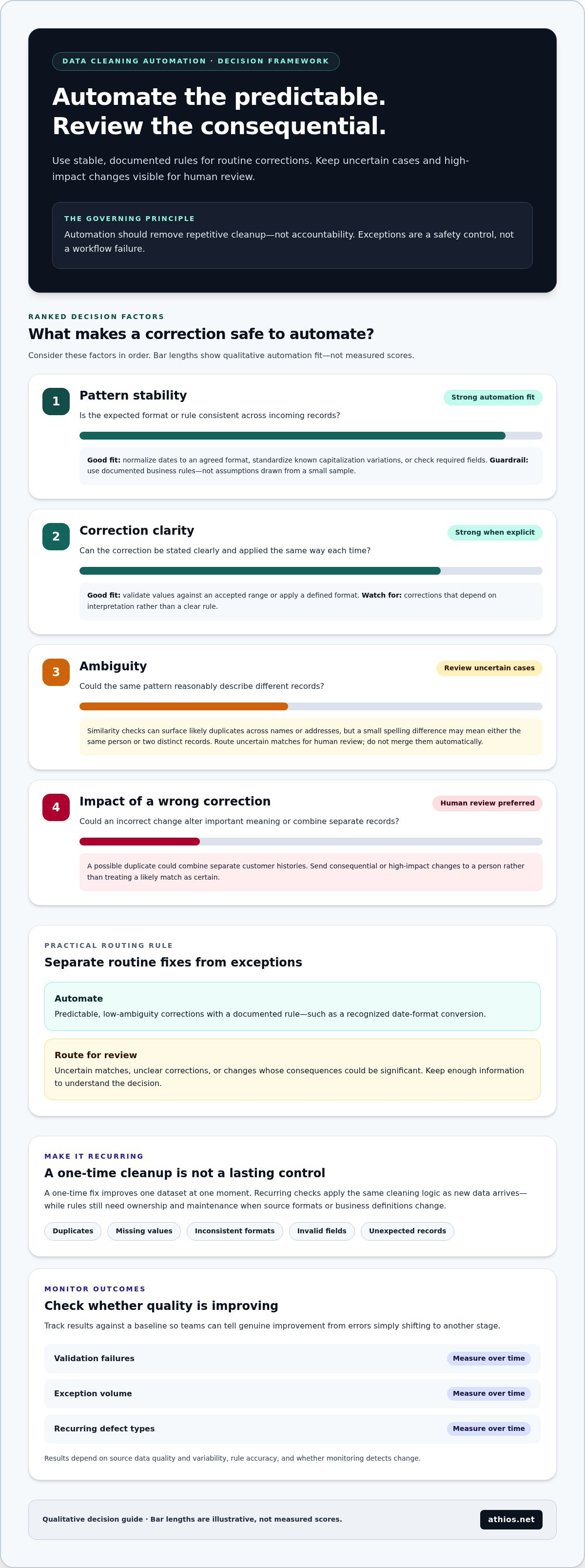
Automation is most reliable when the expected pattern is stable and the corrective action is clear. Teams can normalize dates to an agreed format, check required fields, validate values against an accepted range, or standardize known variations such as capitalization. These controls work best when they reflect documented business rules, not assumptions drawn from a small sample of records.
Duplicate detection can use exact matches, such as identical record identifiers, or configured similarity criteria across fields such as names and addresses. Similarity can surface likely duplicates that do not match exactly, but ambiguous records should not be merged automatically. A small spelling difference may indicate the same person, or two distinct records. Route uncertain cases for human review and retain the information needed to understand the decision.
A practical approach is to automate predictable, low-ambiguity corrections and send uncertain or consequential changes for review. For example, a recognized date-format conversion may be applied automatically, while a possible duplicate that could combine separate customer histories should be assessed by a person. Exceptions are not workflow failures. They are a control for cases where a rule cannot decide safely.
What outcomes should teams expect to improve?
Consistent checks can make incoming data more dependable for reporting, analytics, and downstream processing. Standardized fields support comparisons across sources, while visible validation failures help teams identify records that should not proceed unchanged. Automating repeatable corrections also reduces routine manual handling, leaving staff more time to investigate exceptions and refine rules.
Results depend on source data quality and variability, rule accuracy, and whether monitoring detects changes over time. Track measures such as validation failures, exception volume, and recurring defect types against a baseline. Reviewing them helps teams distinguish genuine improvement from a process that simply shifts errors to another stage.
How to Automate Data Cleaning Across an Ingestion Pipeline
A reliable pipeline treats cleaning as a sequence of controlled handoffs, not a single correction step. Each stage should provide a clear result for the next: profiling informs the rules, transformations prepare records for validation, and validation determines whether data proceeds or enters an exception queue. An automated cleaning workflow profiles incoming data, applies documented transformations, validates results, routes uncertain records for review, and monitors outcomes with traceable logs.
Profile incoming data and define quality rules
Start by inspecting source schemas, formats, completeness, value distributions, and known business constraints. Define explicit checks for required fields, accepted ranges, and standard representations, then record a baseline for normal variation. This gives teams a reference for spotting changes, such as a new category or an unexpected rise in blank values, without treating every variation as a defect.
- Profile the source. Capture the incoming schema, field types, null rates, common values, and structural differences between deliveries. This establishes what the pipeline receives before any changes are applied.
- Define and version the rules. Specify required fields, valid ranges, formats, and business constraints in testable terms. Version rule changes so teams can identify which logic was active for each result.
- Standardize predictable values. Apply deterministic transformations, such as converting dates to an agreed representation or trimming unwanted whitespace. Preserve source values so corrections can be examined and, where appropriate, reversed.
- Validate transformed records. Run checks against the agreed rules after transformation. Passing records can continue; failing records should receive a clear validation result rather than disappearing or being silently altered.
- Route exceptions. Send ambiguous, low-confidence, or high-impact records to a review queue with the failed check and relevant source context. Record reviewer decisions so they can inform future rule refinements.
- Monitor each run. Track validation failures, exception outcomes, and shifts from the baseline. Monitoring makes changes in source behavior visible and signals when rules may need review before defects accumulate downstream.
Transform, validate, and route exceptions
Keep transformation and validation distinct. First apply approved changes, then test the resulting record against target data requirements. This separation helps teams identify whether a failure came from the source, the transformation, or the validation rule, and respond in a controlled way instead of repeating manual investigation.
Maintain lineage from source to destination, including the dataset or batch, rule version, transformation applied, and validation outcome. Correction logs should capture original values, changed values, timestamps, and exception decisions, with access managed according to the organization’s operating requirements. These records support troubleshooting and accountability by showing how a value reached its final state.
For an applied example of automation in an operational data setting, SAE International’s paper on automated data cleaning in manufacturing provides relevant context. Teams designing data cleaning automation solutions for complex ingestion environments can also consider how custom enterprise automation connects data transformation with deployment into existing systems.
Rules-Based, AI-Driven, or Human Review: Choosing the Right Method
Choosing a cleaning method is a control decision, not simply a technology choice. Deterministic rules are repeatable when requirements are explicit. AI can help identify patterns that are difficult to encode directly. Human review is important when context or consequences make a correction uncertain. Effective data cleaning automation solutions assign each task according to data variability, the impact of an incorrect change, and the confidence required before a record can proceed.
| Method | Strengths | Limitations | Appropriate use |
|---|---|---|---|
| Deterministic rules | Consistent, testable, and explainable decisions | Can become brittle when inputs or requirements change | Stable schemas, known formats, and documented constraints |
| AI-assisted detection | Surfaces patterns, similarities, and unusual records | May produce uncertain suggestions or false matches | Variable data where patterns guide review or prioritization |
| Human review | Applies domain context to ambiguous cases | Requires reviewer capacity and consistent decision records | High-impact corrections and cases without a reliable rule |
Use the table as a starting point, then consider the consequences of an incorrect correction. A low-impact formatting adjustment under a stable rule may run automatically. A change that could alter a financial total, combine separate entities, or affect an operational decision should pass through a review gate. Confidence alone is not enough: even a likely correction may need review if its impact is substantial.
When are deterministic rules the better fit?
Rules suit stable schemas, known formats, and clearly defined business constraints because the same input condition produces the same action. Version rules and test them against representative records before deployment, including cases that should pass and cases that should fail. If source formats or business definitions change frequently, tightly coupled rules can become brittle. Monitor for new failures and revise rules through controlled change management.
Where can AI assist without replacing oversight?
AI can identify recurring patterns, estimate record similarity, or flag anomalies that fixed rules may not anticipate. Treat its outputs as decision support when confidence is uncertain or a correction has material consequences: show a suggested action and its supporting evidence, but require review before changing the source record. Preserve reviewer decisions and reasons, then use that feedback to refine detection or rules without removing the audit trail.
A practical operating model assigns routine, well-specified work to rules, uses AI to surface candidates or rank exceptions, and reserves human judgment for ambiguity and material impact. Define review gates before deployment, including criteria for when a record can proceed, must be held, or requires an authorized decision. Teams can adjust those boundaries as they learn from exceptions while keeping decisions traceable and aligned with data quality requirements.
How to Implement Data Cleaning Automation Safely
Start with a bounded, recurring problem, such as inconsistent date formats in one source, rather than trying to automate every data issue at once. A narrow scope makes it easier to define acceptable outcomes, test for unintended changes, and assign responsibility. Expand only after the workflow performs as intended and the team can explain how it responds to exceptions.
- Select a use case. Choose a repeated issue with a clear operational impact and an identifiable owner. Document which records and pipeline stages are in scope, along with the decisions that must remain under human control.
- Establish a baseline. Measure current completeness, validity, duplication, exception volume, and correction reversals. Define how each measure is calculated and record the observation period so future comparisons use the same method.
- Test the workflow. Run the proposed logic against representative data, including ordinary records and known edge cases. Compare its output with reviewed examples before allowing it to change production data.
- Deploy with controls. Introduce the workflow in a controlled manner, monitor results, and document how to pause or roll back material transformations if outputs diverge from expectations.
- Review and refine. Reassess quality measures, exceptions, and reversals at a defined cadence. Adjust rules when sources or business requirements change, and retain the history of those changes.
Measure automation against a defined baseline to distinguish verified quality improvement from a change in how defects are detected or recorded. For example, a rising exception count may reflect a changed source format rather than a decline in the cleaning logic. Interpret measures together and investigate changes before expanding scope to avoid misleading conclusions.
Test automation before expanding its scope
Build test cases for normal, missing, malformed, and ambiguous records, including examples that should pass unchanged. Compare automated outputs with reviewed examples and investigate mismatches before applying transformations broadly. For changes with material downstream effects, use a controlled rollout and define rollback steps in advance, including how to identify affected records and restore prior values where needed.
Assign ownership and monitor changes
Assign clear owners for quality rules, source changes, exception queues, and review decisions. Monitor schema drift, rising exception rates, and shifts in validation outcomes, as each can signal that assumptions need reassessment. Document rule updates, their rationale, and affected downstream processes, then communicate relevant changes to the teams that rely on the data.
These controls matter as data cleaning automation solutions move from a limited use case into recurring operations. For workflows that require tailored scoping, algorithm design, transformation, and deployment, custom enterprise automation can connect those activities to the client environment.
How Custom Data Cleaning Automation Fits Enterprise Workflows
Standardized rules and established tools can address many recurring data issues. A tailored workflow becomes relevant when cleaning depends on complex sources, organization-specific transformation logic, and existing operational constraints. For example, records may arrive from separate systems with different field definitions, identifiers, or update schedules, while downstream teams need a consistent output. In that situation, the engineering task is not simply to apply a generic correction. It is to define how data should move and change across the organization’s workflow.
Custom work is useful when requirements span multiple systems or transformation decisions depend on the organization’s business context. The design should account for current architecture, data ownership, review procedures, and how downstream processes consume results. This differs from adopting a standalone software license: the focus is on designing and deploying a workflow that fits the operating environment.
When does a tailored workflow make sense?
Consider a tailored approach when the same data must be reconciled across sources with different structures, or when a transformation depends on internal definitions. A suitable workflow should fit established interfaces and operating processes, preserve appropriate review points, and make decisions traceable. If a problem is narrow and well-defined, standard rules may be enough. Bespoke engineering is more relevant when those rules cannot address the surrounding complexity.
What does an enterprise automation engagement involve?
An enterprise automation effort can be organized into distinct engineering activities, each with a defined output and decision point:
- Scoping identifies the recurring problem, relevant sources, constraints, intended outputs, and boundaries for automated decisions.
- Algorithm design translates those requirements into decision logic, including where confidence or impact calls for human review.
- Transformation development implements the logic that standardizes, reconciles, or otherwise prepares data for its intended use.
- Deployment integrates the workflow into the client environment and connects it to existing processes for operation and oversight.
Treating these activities separately clarifies what must be decided before implementation and how the resulting workflow will fit into enterprise operations. It also helps technical teams align with the people who understand the data’s business meaning. Deployment is not an isolated handoff: it connects designed automation to the systems and processes where data is received, reviewed, and used.
Athios develops custom AI-driven automation and enterprise data transformation, with engagements that can include scoping, algorithm design, and deployment into client environments. For organizations assessing whether data cleaning automation solutions require tailored engineering, start by defining the recurring use case, source constraints, and desired workflow boundaries. Teams can discuss an enterprise automation project with Athios in that context.
Advance Data Readiness With a Defined Next Step
Decide how data quality should support the organization’s priorities. Treat data cleaning automation solutions as part of the operating model for dependable information, with clear expectations for how cleaned data will be used and who is accountable for keeping it relevant. This connects technical implementation to analytical and operational needs.
For a practical starting point, select an enterprise data challenge that crosses systems or requires organization-specific transformation, then define the intended outcome and operating constraints. Athios develops custom AI-driven automation and enterprise data transformation for federal government and commercial clients. Engagements can include scoping, algorithm design, and deployment into client environments, connecting engineering decisions to the workflow they are intended to support.
Discuss a custom data automation project with Athios to explore an approach aligned with your enterprise requirements. A clearly framed initiative gives your team a concrete basis for planning the work.
Frequently Asked Questions
Can data cleaning automation handle missing values without removing valid records?
Yes. Data cleaning automation solutions can preserve a record while marking a field as missing, applying an approved default, or routing the row for completion. For example, a missing optional middle name should not invalidate an otherwise usable customer record. Define field-specific handling so a blank critical identifier is treated differently, and retain the original record for traceability rather than dropping it automatically.
Is AI required to automate data cleaning?
No. Teams can automate many recurring tasks with explicit rules, such as trimming whitespace, standardizing known date formats, or checking that an identifier follows an expected pattern. AI may help when records vary in ways that are difficult to capture with fixed logic, such as suggesting likely matches across inconsistent descriptions. Use the simplest method that meets the task’s accuracy and oversight requirements.
How should teams handle duplicate records from different source systems?
Define how records should be matched and which source takes precedence for each field before merging anything. A shared identifier may establish a direct match, while similar names alone may indicate only a candidate. Preserve source-system identifiers and the values used to make the match so teams can investigate conflicts. If sources disagree about a consequential field, retain both values for review instead of selecting one silently.
Can data cleaning automation process unstructured data?
Yes. Workflows can prepare unstructured inputs such as free-text notes or documents, but the approach differs from validating a fixed table. A system may extract candidate fields or identify text patterns, then check those outputs against defined requirements. Preserve the original content and distinguish extracted values from verified ones. If meaning is unclear or context changes the interpretation, route the result for human assessment.
What happens when a source system changes its data schema?
A schema change can move fields, change their types, or introduce new names. The pipeline should detect and report structural differences rather than assume the old mapping still applies. For instance, a renamed status field might otherwise be read as missing. Version source definitions, assess effects on downstream consumers, and hold incompatible records until the mapping is reviewed and updated.
How can teams measure whether automated data cleaning is working?
Compare consistent measures over time, such as required-field completeness, records passing validity checks, duplicate candidates confirmed, exception volume, and corrections later reversed. Review these alongside downstream indicators, such as whether scheduled reports receive the fields they depend on. Changes in source volume or format can affect the counts, so document the measurement period and investigate material shifts before attributing them to the automation.
Should automated data cleaning change production records immediately?
Not by default. First compare proposed changes with known examples or process a limited set of records without making them authoritative. Review differences and confirm the rollback path. Direct production changes may be appropriate for well-tested, low-impact rules, but ambiguous or consequential corrections should require approval. Keep prior values and decision history so teams can restore or explain a record if later evidence changes the outcome.

Article by
Kevin Torres


