

Automating a broken workflow can make inefficiency harder to see, not easier to solve. Manual handoffs, duplicate data entry, and confusing interfaces can have different causes, so digital workflow efficiency consulting should begin by diagnosing the friction, not by choosing a tool. Technology may help, but it will not necessarily address the underlying process problem.
This guide explains how to find where work slows down, compare process redesign, user experience improvements, and automation, and build a measured plan that connects people, processes, and technology. It also covers how to assess implementation and track performance so changes are evaluated against operational goals, not simply by whether new technology was deployed.
Athios provides UI/UX improvements, custom automation, application development, and technical architecture to support work shaped around organizational workflows and project requirements. Use the steps ahead to identify the source of friction and select an intervention that supports secure, scalable implementation.
Key Takeaways
- Use digital workflow efficiency consulting to identify friction in handoffs, decisions, exceptions, and ownership before selecting an intervention.
- Compare process redesign, UI/UX improvements, custom automation, and combined delivery by problem fit, dependencies, change impact, and measurement needs.
- Establish a baseline using relevant measures, such as cycle time or rework, so reviews can assess results against operational goals.
- Build a measured improvement plan that moves from workflow selection and diagnosis to intervention, implementation, and ongoing review.
- Match UI/UX, custom AI automation, application development, and architecture to the diagnosed need rather than treating technology as a fixed solution.
Digital Workflow Efficiency Consulting: Identify the Friction Before Choosing a Fix
Digital workflow efficiency consulting is the structured analysis and improvement of processes that rely on digital systems, with changes selected to reduce unnecessary effort while preserving the workflow’s intended outcomes and controls. The focus is the work moving through the organization, not just the technology supporting it. A process can be digitized and remain inefficient if duplicate entry, unclear handoffs, or avoidable approvals simply move into a new interface.
Modernization and efficiency are related, but they are not interchangeable. Replacing paper forms with an online form may improve access while retaining redundant fields and manual routing. A workflow review asks which steps create value, where information is repeated, who owns each decision, and what happens when a case does not follow the standard path. A workflow management system can coordinate tasks and information, but the process still needs clear roles and sound design.
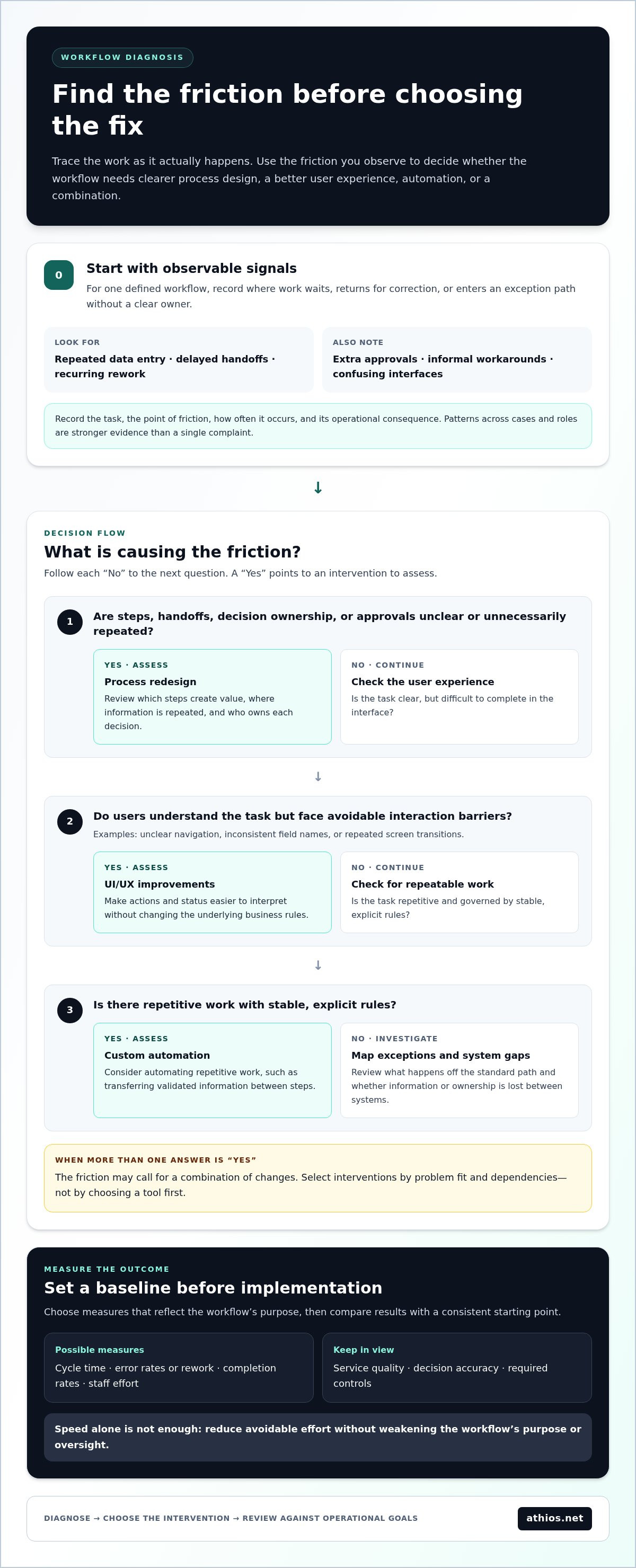
Start with observable signals rather than a preferred solution. Repeated data entry may point to disconnected systems or unnecessary information collection. Delays may cluster at handoffs when responsibility is unclear, while recurring rework may stem from incomplete information or inconsistent decisions. Extra approvals and informal workarounds also deserve review. Each may have a valid purpose, but that purpose should be clear in the process rather than assumed.
Which workflow symptoms indicate a need for structured analysis?
Look for patterns across cases, roles, and stages. A single complaint may reflect an isolated incident; the same obstacle reported by different users or repeated in completed work is stronger evidence of a process issue. Record where work waits, returns for correction, or enters an exception path without a clear owner.
Interface friction can add to these problems even when systems remain available. Employees may switch between screens to reconcile the same case, for example, or encounter different field names in tools used at successive stages. Record the task, the point of friction, how often it occurs, and its operational consequence. This gives teams a practical basis for distinguishing a process problem from a user experience issue or a system connection gap.
What should an efficiency outcome mean to the organization?
Define the desired result in terms of the workflow’s purpose. Cycle time may matter for a time-sensitive process; error rates or rework may matter more when accuracy is central. Completion rates and staff effort can also show whether a change makes the process easier to complete and oversee.
Choose measures that can be observed and compared with a baseline. If reliable data is limited, document a consistent starting method before implementation rather than treating assumptions as results. Speed alone is not enough: service quality, decision accuracy, and required controls must remain part of the assessment. An effective outcome reduces avoidable effort without weakening the workflow’s purpose or oversight.
How Consulting Connects Process Design, User Experience, and Automation
Effective digital workflow efficiency consulting follows a disciplined sequence: understand how work is performed, locate friction across its steps, assess possible interventions, and define a change that fits the need. This order prevents teams from treating every delay as a software problem. A process may need clearer decision rights, a more usable interface, better system connections, or a combination of changes.
Document what happens in practice, not only what a procedure says should happen. A request, for example, may pass through an intake team, a specialist, and an approving manager, while missing information sends some cases back for clarification. Mapping the actual flow makes handoffs, decisions, exceptions, systems, and ownership visible. IBM’s overview of what a digital workflow is provides context for how digital steps coordinate work and information.
How process mapping reveals avoidable effort
For one defined workflow, capture its participants, inputs, decision points, systems, and outputs. Note where work waits, where information changes hands, and which path exceptions follow. Business Process Model and Notation (BPMN) is one shared reference for visualizing process steps, but it is not mandatory. A simpler diagram may work better if it communicates the workflow clearly.
A useful map supports comparison between the intended process and observed practice. If staff routinely maintain a separate tracking sheet, for instance, that may indicate a gap in visibility or system support. The map does not prescribe a fix. It gives process owners and technical teams a shared basis for deciding whether to simplify steps, clarify roles, adjust interfaces, or connect systems.
When user experience or automation becomes relevant
Interface changes are relevant when users understand the task but face avoidable interaction barriers, such as unclear navigation, inconsistent labels, or repeated screen transitions. UI/UX improvements can make actions and status easier to interpret without changing the underlying business rules. Usability testing and review of task steps can help distinguish a design obstacle from a process decision that needs broader attention.
Custom automation may suit repetitive work with stable, explicit rules, such as transferring validated information between steps. Automating an unclear process can preserve its underlying inefficiencies by executing unnecessary steps faster without resolving why they exist. Where decisions have material consequences or require judgment, retain appropriate human review and control points rather than assuming full automation is suitable.
Let the evidence guide the intervention: redesign the process when steps or ownership cause friction, improve the interface when interaction is the barrier, and automate only work that is sufficiently defined. Athios aligns UI/UX and custom automation capabilities with diagnosed workflow needs and organizational requirements.
Compare Workflow Improvement Approaches Before Committing to Technology
Workflow evidence should determine the intervention, not a preference for a particular technology. A process with unclear ownership calls for a different response than a sound process slowed by confusing screens or repetitive data handling. Use the comparison below to assess fit, dependencies, operational impact, and how to evaluate a change before implementation.
| Approach | Problem fit | Dependencies | Change impact | Measurement considerations |
|---|---|---|---|---|
| Process redesign | Unclear ownership, redundant approvals, or inconsistent steps | Stakeholder agreement, policy authority, and defined decision rights | Roles or sequence may change, even without new software | Track cycle time, delays, exceptions, and rework against a baseline |
| UI/UX improvement | Confusing navigation, unclear labels, or avoidable interaction steps | Access to user feedback, interface design, and relevant application components | Users encounter revised screens or task flows | Assess task completion, errors, user effort, and support needs |
| Custom automation | Repetitive work with defined rules and usable data | Reliable inputs, system access, exception handling, and control requirements | Tasks or information transfers change; oversight may need adjustment | Measure handling time, exceptions, errors, and review effort |
| Combined delivery | Connected process, interface, and repetitive-work issues | Coordination across process owners, users, and technical teams | Multiple workflow components change, requiring clear sequencing | Evaluate both workflow-level outcomes and component-specific measures |
When process redesign is the primary intervention
Choose process redesign when friction stems from how work is assigned or authorized. Redundant approvals, conflicting instructions, and inconsistent handling often require agreement on roles and decisions before software changes can help. Dependencies may include policy interpretation, stakeholder alignment, and operational responsibilities. Clarify these first to avoid encoding steps the organization intends to remove in a new system.
When UI/UX improvements or automation fit better
UI/UX improvements fit when users know what to do but face avoidable navigation or interaction barriers. Automation fits repetitive work when its rules are sufficiently defined and the required data is usable. A combined intervention makes sense when evidence shows connected issues, such as unclear process steps alongside repeated data transfer, not simply because multiple technologies are available.
Address disruption through controlled scope rather than assuming change can be eliminated. Start with a bounded workflow segment, define decision rights and review points, and preserve a clear path for handling exceptions. A phased rollout lets teams evaluate early results and resolve issues before extending the change. This ties each implementation step to an identified problem and an operational performance measure.
Build a Measurable Workflow Efficiency Consulting Plan
A practical plan connects a defined operational need to a scoped change and a review method. Digital workflow efficiency consulting should specify what will change, who is responsible, what information is needed, and how the organization will judge the result. The sequence below supports disciplined planning without treating technology deployment as the outcome.
- Select one workflow. Choose a process with a clear operational purpose and observable friction, then set boundaries for the stages included and excluded.
- Define the current state. Identify users, systems, inputs, decisions, handoffs, outputs, exceptions, and the teams accountable for each stage.
- Set the intended outcome. Specify what should improve, such as cycle time, rework, completion, or staff effort, while preserving service quality and controls.
- Establish a baseline. Select a small set of measures that can be collected consistently. Record the collection method, period, and any known data limitations.
- Scope dependencies and safeguards. Include stakeholder input, data access, security considerations, system connections, policy dependencies, and review responsibilities in the project scope.
- Plan delivery and adoption. Define phases, affected user groups, feedback points, operational ownership, and how exceptions will be handled during implementation.
- Evaluate and review. Compare post-change measures with the baseline, investigate unintended effects, and assign responsibility for ongoing monitoring and adjustments.
Scope one workflow and establish a baseline
A useful boundary is specific enough to measure but broad enough to include the handoffs that shape the outcome. For example, define whether a request workflow begins at submission or initial review, and identify where it ends. Select measures suited to the process, such as elapsed time between defined events or the frequency of returned work. Record quality expectations and exception types alongside efficiency measures so faster completion does not obscure control failures or incomplete service.
Plan implementation, adoption, and evaluation
Phased delivery can limit the scope of initial change and create points for user feedback and operational review. Assign an owner for process decisions, technical dependencies, data access, and performance monitoring. Responsibilities should remain clear after implementation. If automation is relevant, define its rules, inputs, exceptions, and human review before deployment. Connect any supporting AI guidance to that specific use case rather than treating automation as the default.
After implementation, review results with the people who perform and oversee the work. Compare measures using the same definitions as the baseline, and document where performance, user experience, or control requirements differ from expectations. Athios tailors workflow-related technical scope to organizational needs, drawing on UI/UX improvement, custom automation, application development, and architecture capabilities. Discuss a workflow improvement engagement with Athios to align a plan with your workflow and operational requirements.
How Athios Aligns Workflow Improvements With Enterprise Technology
Workflow needs differ across organizations, so the technical response should follow the diagnosed problem rather than a fixed package of tools. Athios aligns its UI/UX, custom automation, application development, and architecture capabilities with the process and operating context, shaping scope around organizational requirements. This connects digital workflow efficiency consulting to practical decisions about what to change, how to implement it, and which operational constraints the work must respect.
Match Athios capabilities to the diagnosed workflow
Each capability addresses a different type of workflow need. UI/UX improvements can help when interface design creates unnecessary effort, such as confusing navigation or interaction steps that interrupt task completion. Website and mobile application development may be appropriate when the workflow requires application changes designed around user tasks.
For repetitive handling with defined rules, custom automation can support selected workflow activities, while data transformation can address how information is prepared or moved between stages. These options depend on the workflow’s inputs, exceptions, and review requirements. When implementation involves multiple enterprise systems, technical architecture can guide how a change fits the existing environment. Cybersecurity sustainment is also relevant when maintaining security considerations is part of ongoing engineering work.
These capabilities are not interchangeable. An interface issue does not automatically require automation, and repetitive work does not necessarily call for a new application. Athios aligns technical choices with the diagnosed source of friction, taking account of users, system dependencies, information flows, and operational controls. The objective is a coherent intervention, not technology deployment for its own sake.
Define a suitable engagement and next step
Project scope and deliverables are structured around organizational requirements and workflow context. Depending on the work, an engagement may be organized around project milestones and defined deliverables or through a time-and-materials arrangement. Scope can establish what is included, which teams and systems are involved, how decisions will be made, and how progress and operational requirements will be reviewed.
Preparation supports a focused planning discussion. Outline the workflow’s start and end points, the people or teams involved, known constraints, systems and data dependencies, and the outcome the organization intends to evaluate. Include exceptions and relevant control requirements, since they may affect technical design and implementation sequencing. This information connects the intervention to the operating environment without presuming a particular solution or efficiency result.
Athios serves federal and commercial clients through tailored IT consulting and engineering work, aligning technical delivery with project requirements.
Make the Next Workflow Decision With Confidence
Improvement does not need to begin with a large transformation. Select a workflow where a clearly defined change can be assessed, then use what the organization learns to guide subsequent decisions. This creates a disciplined path from operational need to appropriate design and engineering work, keeping future investment connected to evidence rather than assumption.
For teams assessing digital workflow efficiency consulting, bring the process context into the planning conversation: its boundaries, users, constraints, and intended outcomes. Athios supports federal government and commercial clients with capabilities in UI/UX improvements, custom AI automation, and application development, aligning project scope with organizational requirements without presuming a particular result.
To discuss a workflow challenge and identify a practical technical direction, contact Athios about workflow improvement support.
Frequently Asked Questions
What does digital workflow efficiency consulting include?
Digital workflow efficiency consulting can include an assessment of how work moves between people and systems, analysis of user interaction, and recommendations for process or technical changes. Depending on the need, work may also include UI/UX improvements, custom automation, data transformation, or application development. For example, an assessment of a digital intake process might examine form completion, routing, and status visibility, then define suitable changes and how to evaluate them.
How do you measure digital workflow efficiency?
Measure performance using indicators tied to the workflow’s purpose and the organization’s service expectations. For a case-handling process, compare elapsed time from receipt to resolution; for a form-based process, review incomplete submissions or returns for correction. Define exactly when each measure starts and ends, and use the same data source and method before and after a change. This helps distinguish an operational shift from changes in reporting or case mix.
Can workflow efficiency improve without automating the process?
Yes. A team may improve a workflow by changing unclear instructions, reducing unnecessary data fields, or clarifying who acts after a request is submitted. If staff repeatedly contact applicants to obtain information that could be requested clearly at intake, revising the form may reduce follow-up without automating a task. Evaluate these adjustments on their own, then use the results to decide whether further technical work is warranted.
How long does a digital workflow consulting engagement take?
The duration depends on the engagement’s scope, deliverables, and operational dependencies, so there is no single timeline that applies to every organization. A focused review of one workflow differs from work that includes application development, system integration, or implementation across multiple teams. Access to users, process documentation, and relevant systems can also affect scheduling. Athios structures engagements around project requirements, including project-based or time-and-materials arrangements.
What information should an organization prepare before a workflow assessment?
Prepare a concise description of the workflow’s purpose, where it begins and ends, the roles involved, and the systems used. Useful materials may include current procedures, blank forms, example status reports, and anonymized cases that show common paths or exceptions. Identify a process owner and people who perform the work, and note information-access constraints. Avoid sharing sensitive records until the organization has established an appropriate method for providing them.
Does digital workflow efficiency consulting require replacing existing systems?
No. An assessment may identify changes that work within existing systems, such as clarifying process steps, improving an interface, or adjusting how information moves between applications. Replacement may be considered only if the diagnosed need and technical context support it. Document current system capabilities, dependencies, and constraints early to distinguish a process or usability issue from a limitation that requires architectural or application-level work.
Is workflow automation appropriate for every repetitive task?
No. Repetition alone does not make a task suitable for automation. Consider whether the steps follow stable rules, whether input data is reliable, how exceptions are handled, and whether a person must exercise judgment. Transferring consistent fields may be a candidate, while evaluating incomplete or ambiguous submissions may require human review. Include oversight and correction procedures in the design so automated handling remains observable and manageable.

Article by
Kevin Torres


