

A successful enterprise redesign modernizes workflows without destabilizing the systems employees rely on. That is the central challenge of UI redesign for enterprise applications: making frequent, complex tasks easier to complete while preserving essential capabilities and operational continuity.
Legacy interfaces can slow work, but a visual refresh alone will not resolve friction rooted in processes, integrations, or competing stakeholder priorities. Redesign decisions should reflect how people use the application, what the business needs to protect, and how existing technology constrains change. Adoption also depends on introducing improvements in a way that supports users without interrupting their responsibilities.
This guide presents a case-study-led approach to scoping redesign around real user and business needs. It compares options for usability, risk, and technical fit, then outlines practical steps from research through implementation and evaluation. It also explains how to account for security, scalability, and existing systems when making interface decisions. Athios brings UI/UX design improvements together with application engineering to help federal and commercial organizations modernize interfaces while keeping system capabilities and operational needs in view.
Key Takeaways
- Use workflow friction to define the redesign problem, grounding priorities in user tasks and operational needs.
- Structure research from discovery through validation so evidence informs interface decisions and produces clear design artifacts.
- Compare a visual refresh, targeted workflow redesign, and broader rebuild by user impact, implementation dependencies, and change scope.
- Set evaluation criteria before rollout, using tracked measures such as task completion, error patterns, support demand, or user feedback.
- Approach UI redesign for enterprise applications as part of application engineering, accounting for existing systems, security, and scalability.
Why UI Redesign for Enterprise Applications Starts with Workflow Friction
For federal and commercial organizations, an enterprise application is part of a wider operating environment. It connects with established systems and supports people with different responsibilities. A strong redesign case begins with evidence about the organization, the application, its user groups, and the operational challenge. That context helps teams avoid solving a visible interface problem while overlooking a process issue or system dependency.
Enterprise UI redesign improves interface structure and how people interact with tasks in complex application environments. A visual refresh changes presentation, such as typography, color, spacing, or component styling. A workflow-oriented redesign examines how users move through work, then changes the interface to clarify or simplify those interactions while accounting for existing capabilities and dependencies. The distinction matters: a polished screen can still preserve an inefficient process.
Start with the friction users encounter, then investigate its cause. A confusing status label is visible, but uncertainty about the next action may be the underlying workflow problem. Repeated data entry is an interface symptom, while duplicated steps across a process may point to a deeper cause. The Wikipedia's 2022 Desktop Interface Redesign offers a public example of redesign goals involving navigation, readability, and access to page tools, rather than treating appearance as the only concern.
Which enterprise application problems justify a redesign?
Prioritize recurring friction in important user journeys. Use documented feedback, support themes, and task observations to distinguish patterns from isolated complaints. A one-off visual defect may call for a localized correction. Repeated confusion about task status, duplicated actions, or inconsistent controls across a key workflow may justify broader investigation. Connect each problem to an operational objective, such as reducing avoidable rework, making task status easier to interpret, or supporting consistent process execution. These are evaluation aims, not assumed project results.
- Record the evidence: Note the affected task, the difficulty users encounter, and how the issue was identified.
- Locate the cause: Determine whether the issue stems from a control, unclear information, process sequence, or system dependency.
- Set a priority: Weigh how often the issue occurs and its operational importance against implementation constraints.
Who needs to be represented in the redesign?
Map user roles, permissions, experience levels, and task frequency using approved project evidence. Include operational owners who understand process requirements, product leaders responsible for priorities, and technical stakeholders who can explain system dependencies. Their needs may conflict: one role may need more detail while another needs a faster path through routine work. Make these trade-offs explicit, then prioritize according to documented user impact, operational importance, and technical fit rather than assuming everyone agrees.
This disciplined starting point makes UI redesign for enterprise applications a decision process grounded in evidence. It gives the next phases a defined problem to address, a clear reason for investment, and boundaries for improving interaction without assuming core system capabilities can be discarded.
How Enterprise Application UI Redesign Connects Research to Interface Decisions
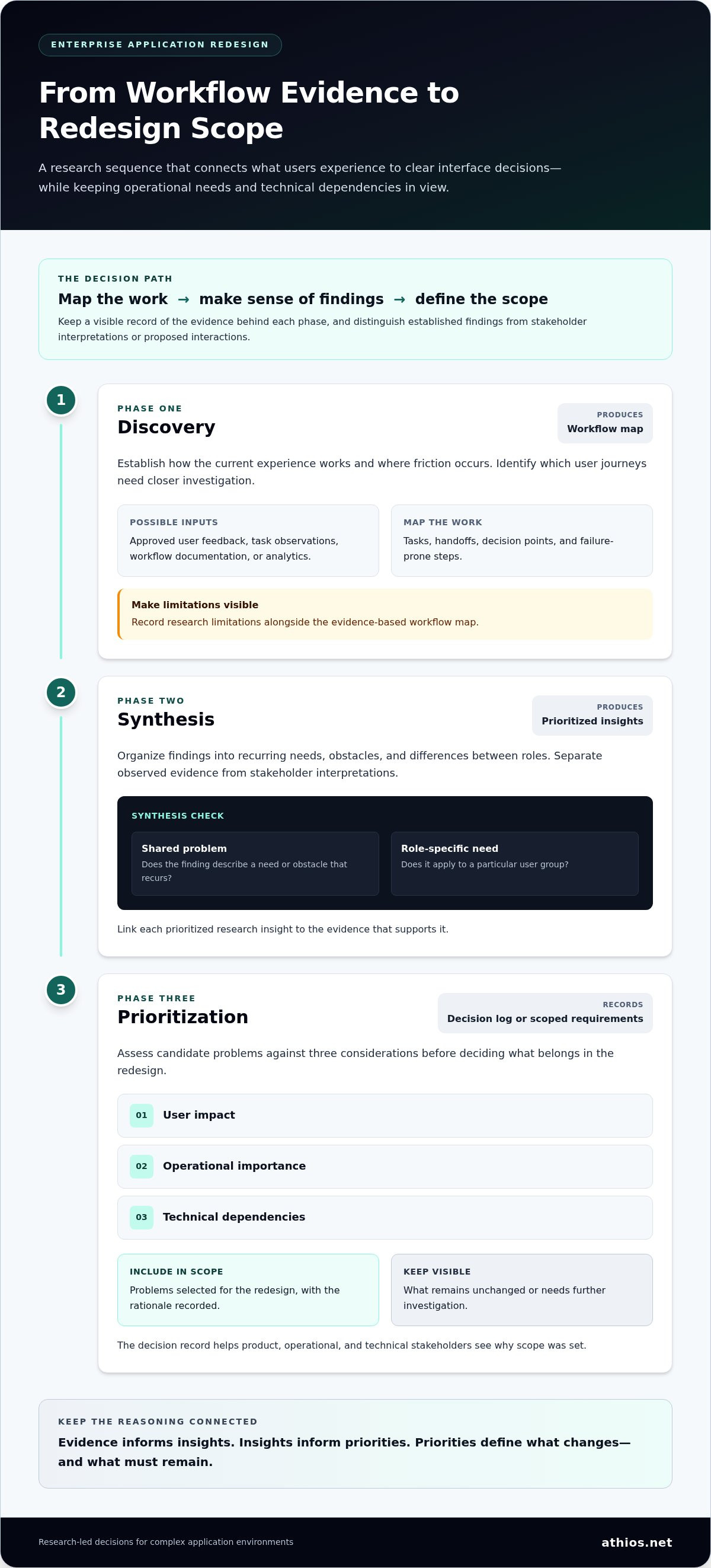
A defensible redesign process makes the path from evidence to interface decisions visible. Keep a clear record of what the project actually established and which methods informed the work. A workflow map, for example, should reflect documented observations or approved process information, while a prototype should be described as a proposed interaction rather than a change to the live system. The sequence below connects each phase to an artifact that informs the next.
Enterprise redesign decisions must serve the people completing the work and respect the systems, permissions, and dependencies that make that work possible.
- Discovery. Establish how the current experience works and where friction occurs. Inputs may include approved user feedback, task observations, workflow documentation, or analytics. Map tasks, handoffs, decision points, and failure-prone steps, then identify which journeys warrant closer investigation. Produce an evidence-based workflow map and record any research limitations.
- Synthesis. Organize findings into recurring needs, obstacles, and differences between roles. Compare observed evidence with stakeholder interpretations rather than treating them as equivalent. Decide which findings describe a shared problem and which apply to a specific user group. Produce prioritized research insights linked to supporting evidence.
- Prioritization. Assess candidate problems against user impact, operational importance, and technical dependencies. Decide what belongs in the redesign scope and what should remain unchanged or needs further investigation. Record the rationale in a decision log or scoped requirements so product, operational, and technical stakeholders can review the trade-offs.
- Prototyping. Translate prioritized needs into potential changes to navigation, terminology, information hierarchy, and task-focused screens. Use the workflow map and requirements to decide which interaction patterns merit testing before development. A prototype and design annotations make proposed behavior concrete without implying the underlying system has changed.
- Validation. Test proposed journeys with representative users when that work is part of the project. Observe whether navigation, labels, and task sequences are understood, then document findings and design changes. Produce a validation record that connects each finding to a decision, such as revising the prototype or recording why a design choice remains.
- Implementation. Convert validated designs into build-ready specifications that identify relevant system dependencies and operational constraints. Decide how components and changes fit the application architecture and delivery plan. Give engineering teams implementation guidance and record unresolved dependencies. Assess accessibility against project requirements rather than claiming unmeasured results.
How does discovery expose high-impact interface friction?
Choose research methods that fit the evidence available. During task observation, capture the sequence users follow and where they pause, repeat an action, or need clarification. When findings come from feedback or support themes, identify them as such. A workflow map should make handoffs and decision points visible, while a separate note records gaps in the evidence and questions that remain open. This makes it easier to see whether a problem affects a single screen or several steps in a journey.
How do prototypes and validation reduce redesign risk?
Prototypes let teams examine navigation, terminology, task sequence, and interaction patterns before implementation makes changes more costly to revise. Include users whose roles and permissions reflect the intended workflow. Record what they encountered, what changed in response, and what remains constrained by system dependencies. This creates a traceable basis for decisions without implying universal agreement or guaranteed adoption.
For teams planning UI redesign for enterprise applications, this research-to-decision discipline connects interface choices with application engineering. Athios brings UI/UX improvements together with web, mobile, and custom software development, accounting for secure and scalable implementation. Explore Athios application engineering as part of a structured redesign effort.
Enterprise UI Redesign Approaches Compared: Refresh, Workflow Redesign, or Rebuild
Once the problem is defined, decide how much of the application needs to change. A visual refresh can improve clarity and consistency while preserving established interactions. A targeted workflow redesign changes selected journeys, while a broader rebuild revisits the application itself. These approaches differ in user impact, technical dependency, and scope. Select one based on evidence and system conditions, not appearance alone.
The comparison below is a decision framework, not a claim about a particular project. Match the approach to documented friction, system condition, risk tolerance, and project goals.
| Approach | Likely user impact | Implementation dependency | Relative scope | Suitable conditions |
|---|---|---|---|---|
| Visual refresh | Improves readability, clarity, and consistency without intentionally changing task flow. | Usually focuses on presentation and interface components; dependencies still require review. | Limited | Core workflows work as intended, while visual hierarchy or control consistency creates friction. |
| Targeted workflow redesign | Changes how users complete selected tasks, navigate steps, or interpret information. | May depend on data structures, permissions, integrations, or existing application behavior. | Moderate | Evidence identifies recurring difficulty in specific journeys, while broader system capabilities remain suitable. |
| Application rebuild | Can change the wider interaction model, but also introduces greater transition and adoption demands. | Relies on significant engineering and architecture decisions, including continuity with existing systems. | Extensive | Documented constraints show that targeted changes cannot address the defined problem within the current foundation. |
When is a targeted interface refresh sufficient?
A refresh is appropriate when task sequences remain effective and evidence points to presentation problems, such as unclear visual hierarchy, inconsistent controls, or difficult-to-read content. It can make established patterns easier to recognize without requiring users to learn a new process. However, changing colors or spacing will not resolve duplicated steps, missing information, or unclear task ownership. If research identifies these deeper causes, address the workflow rather than disguising its symptoms.
When should a redesign address workflows or underlying architecture?
Repeated handoffs, fragmented journeys, and dependencies between systems may mean selected screens cannot be improved in isolation. A design and engineering review can clarify which changes are possible within current application behavior, where integrations or permissions constrain options, and whether architectural work is relevant. Complete this assessment before committing to broader scope so teams can distinguish a workflow problem from a system limitation.
A larger redesign is not automatically a better decision; the right scope is the smallest change that addresses documented friction without creating disproportionate technical or operational risk. For UI redesign for enterprise applications, this principle keeps investment aligned with user needs and system realities, whether the evidence supports a focused refresh, a workflow change, or a broader rebuild.
How to Measure and Roll Out an Enterprise Application Redesign
Plan evaluation before implementation, not after launch. Connect redesign goals to operational priorities, then select measures that show whether the intended tasks have become clearer or more reliable. In a case study, report only approved baselines and tracked results, and describe the measurement conditions so readers understand what was compared.
A baseline might record how users complete a defined task, where errors occur, or which support themes relate to that workflow. The right measure depends on the problem being addressed. A clearer screen does not automatically demonstrate faster work, and a change observed after release does not by itself prove that the redesign caused it.
Which measures can demonstrate redesign progress?
Choose measures that correspond directly to the user task or operational objective. Compare post-launch observations with a documented baseline gathered under comparable conditions, noting differences in user group, task scope, or measurement method. Include only measures tracked in the project record. If there is no baseline, state that limitation rather than estimating an improvement.
- Task completion: Track whether users complete the selected workflow and where they stop or need assistance.
- Error patterns: Record errors relevant to the task, distinguishing interface-related issues from system or process causes.
- Support demand: Review related support themes when they are consistently categorized and available for comparison.
- User feedback: Summarize feedback tied to specific tasks, roles, and collection methods rather than treating individual comments as universal evidence.
How can teams manage adoption and continuity?
Plan release sequencing around affected user groups, system dependencies, and the operational risk of changing a workflow. A phased release may let teams observe an initial deployment before expanding it, but the right approach depends on the application and project constraints. Document who is affected, what changes, and where users can find approved guidance or support.
Training and communication should reflect the actual interface changes. If familiar task steps or terminology change, explain the new path and provide relevant instructions before users encounter it. Treat training and support channels as rollout considerations unless they are documented project activities.
After each release, review selected measures and user feedback against the baseline. Share findings with the people responsible for design, operations, and engineering, then decide whether to refine the interface, investigate a system dependency, or retain the current design. This feedback loop supports controlled iteration without promising disruption-free delivery.
UI redesign for enterprise applications requires evaluation to connect user experience with implementation realities. Athios combines UI/UX design improvements with web, mobile, and custom software development, with attention to secure and scalable solutions. Discuss application design and development as part of a measured redesign approach.
How Athios Approaches UI Redesign for Enterprise Applications
Athios provides UI/UX design improvements alongside website, mobile application, and custom software development for federal and commercial clients. This broader application engineering capability puts interface decisions in context: a redesigned screen must work with the application’s behavior, technical dependencies, and operational purpose. The objective is to define a practical scope for change, not to assume every usability issue requires a new system.
For UI redesign for enterprise applications, connect design and engineering considerations from the outset. Navigation, task steps, information display, and permissions can affect how an interface interacts with application architecture. Security and scalability also belong in the design context and should be considered during implementation, not treated as outcomes to assume.
How does design connect with enterprise engineering?
Assess interface concepts against how the application handles information, user access, and existing system connections. A proposed change to a task sequence, for example, may depend on where required information comes from or which roles can take a particular action. Early coordination between design and engineering can expose these dependencies before teams commit to a design that does not fit the application environment.
A sound design direction considers both the user-facing experience and the technical conditions for implementation. Athios’s work across UI/UX improvements, web and mobile development, and custom software supports this connected perspective. Security and scalability inform the design and engineering discussion, but should not be presented as guaranteed results without project-specific evidence.
What should a redesign engagement establish at the outset?
Before work proceeds, align the people involved on the problem, its users, and the boundaries of the proposed change. Clear decisions at this stage keep design activity tied to organizational objectives and make later evaluation more meaningful. Establish:
- Target users: The roles, permissions, and experience levels relevant to the application and its priority tasks.
- Priority workflows: The journeys in scope, the friction being addressed, and the operational purpose of improving them.
- System context: Relevant application behavior, dependencies, and technical constraints that may shape feasible options.
- Decision-makers: The operational, product, and technical stakeholders responsible for setting priorities and resolving trade-offs.
- Evidence and measures: The available research, documented limitations, and project-approved criteria for evaluating the redesign.
These foundations distinguish a defined redesign objective from a general request to modernize an interface. They also give the team a basis for deciding what should change, which capabilities must remain, and how success will be assessed without presuming results.
Organizations planning an enterprise application redesign can discuss their users, workflows, and system context with Athios. Discuss your enterprise application redesign and establish a measured starting point for design and development.
Set a Clear First Step for Your Redesign
The next step does not need to be a commitment to a full rebuild. Select one important workflow, document where users encounter friction, and identify the system capabilities that must remain intact. This bounded starting point gives stakeholders a concrete basis for deciding what to investigate, which trade-offs need attention, and how progress should be evaluated.
For UI redesign for enterprise applications, disciplined scope is a practical safeguard. It connects user needs to operational priorities before teams commit to broad changes. As evidence develops, the organization can determine whether the right response is a focused interface adjustment, a workflow change, or a larger engineering effort.
A useful initial discussion can establish the users, task, technical context, and decision criteria that will guide the work. Discuss an enterprise application redesign with Athios and identify a measured path from the current experience to a more effective one.
Frequently Asked Questions
How long does a UI redesign for an enterprise application take?
There is no dependable generic duration because schedules depend on scope, access to users and systems, stakeholder decisions, technical dependencies, and validation needs. Establish milestones around concrete deliverables, such as an agreed workflow scope, reviewed prototypes, implementation readiness, and evaluation criteria. Discovery can clarify unknowns before implementation is planned, while phased delivery may change the sequence of work. Treat the schedule as a project plan, not a standard duration.
What is the difference between enterprise UI redesign and UX redesign?
UI redesign addresses the application’s interface, including layout, navigation, visual hierarchy, and controls. UX redesign considers the broader experience of reaching a goal, including task sequences, handoffs, and obstacles across the workflow. For example, improving the placement of a status indicator is a UI decision; determining what status users need at each point in a review process is a broader UX question. Enterprise projects often need both perspectives to align screens with work.
How can teams measure whether an enterprise application redesign succeeded?
Define success against the project’s objectives and a baseline for the specific tasks being changed. For UI redesign for enterprise applications, teams might compare completion, error patterns, or support requests for the same workflow before and after release, if those measures are tracked. Keep task definitions, user groups, and observation conditions consistent where possible. Record limitations, and avoid claiming that the redesign caused a change when other factors could have contributed.
Can an enterprise application be redesigned without replacing its existing systems?
Often, teams can improve an interface while retaining existing systems, but feasibility depends on the application architecture, integrations, data flows, and technical constraints. For example, a clearer review screen may be possible without changing how records are stored, while a new task sequence may depend on information the current system does not expose. Establish these boundaries early so the design scope reflects actual dependencies rather than presuming either replacement or compatibility.
How do you redesign an enterprise application for users with different roles?
Start by documenting what each role is permitted and expected to do, then distinguish shared tasks from role-specific ones. For example, a staff member who prepares a record and a manager who approves it may need different actions and supporting information within the same process. Use a role-and-task matrix to expose overlap, avoid presenting irrelevant controls, and identify access boundaries. Validate the proposed arrangements with users representing each relevant role.
What should an enterprise UI redesign case study include?
A useful case study identifies the application context, intended user groups, documented challenge, research evidence, design decisions, implementation constraints, and evaluation method. It should also state which deliverables were produced and how findings influenced the work. Separate measured outcomes from objectives, and explain the baseline and measurement conditions for any reported results. If numerical outcomes cannot be published, describe verified process evidence without inventing metrics or implying unsupported causation.

Article by
Kevin Torres


