

An enterprise website can fit a phone screen and still fail the people who depend on it. Responsive website development for enterprises must keep each user’s priority task clear, whether they need to review data, approve a request, or find critical information on a different device. Shrinking a desktop layout can hide controls, disrupt workflows, and create accessibility or performance problems.
Enterprise interfaces often combine dense information, role-based tasks, and integrations. Making them responsive means coordinating design, engineering, security, and content decisions so the layout changes without compromising essential work.
This guide covers the design and technical foundations of responsive enterprise websites, plus a practical process for planning, building, and validating them. Use it to identify what must remain accessible on every screen, choose appropriate layout patterns, and test workflows before and after release.
Key Takeaways
- Plan responsive behavior around users’ priority tasks and content, not separate templates for individual devices.
- Understand how HTML structure, CSS layout rules, and JavaScript behavior work together in adaptable enterprise interfaces.
- Compare responsive and adaptive design based on user needs, maintenance, and engineering complexity.
- Bring product, design, engineering, security, and content stakeholders into planning and validation.
- Use design systems, component standards, and clear ownership to maintain responsive interfaces as they evolve.
What Responsive Website Development Means for Enterprise Teams
Responsive development adapts a website to different viewport sizes so its content and controls remain usable. The goal is not to reproduce a desktop page at a smaller scale. It is to preserve access to essential information and tasks while arranging the interface to suit the available space.
Responsive enterprise design is the engineering of layouts that adjust to a user’s screen while keeping priority tasks clear, accessible, and functional. The arrangement can change on a compact screen, but actions such as approving, searching, or reviewing information should remain easy to complete.
How responsive layouts adapt to different screens
Responsive layouts combine several techniques. Fluid grids size columns in relation to available space. Flexible media scales images and other visual elements within their containers. Breakpoints change the layout when the content no longer fits comfortably. These principles are outlined in Responsive Web Design.
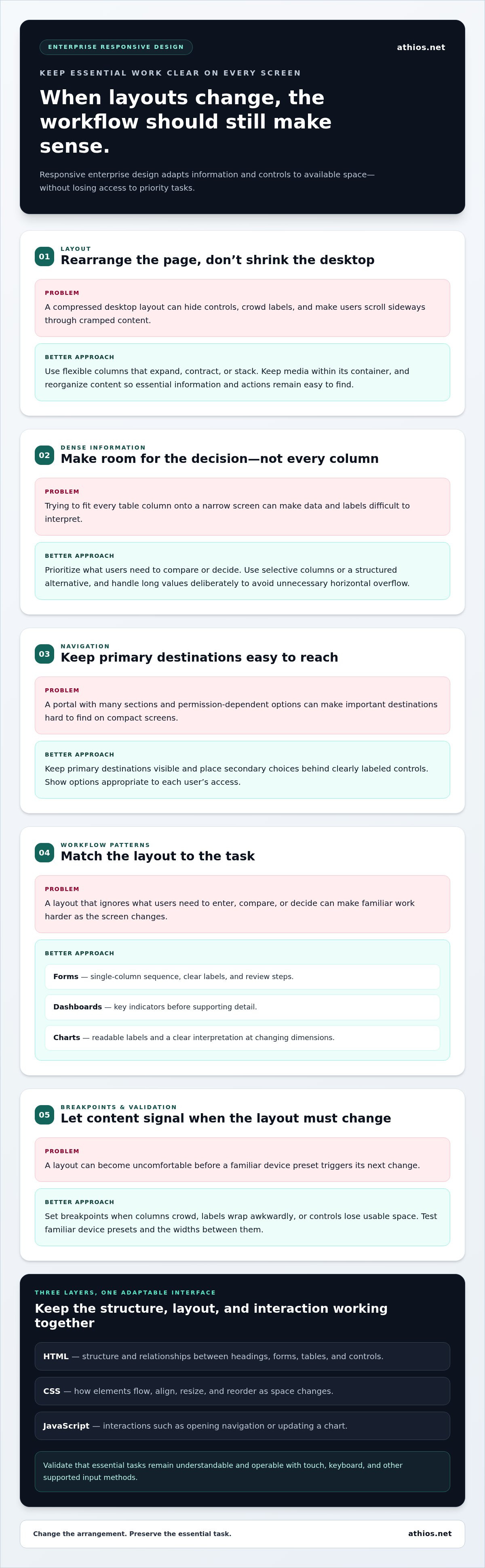
Teams must also decide what information appears first, how controls remain reachable, and whether content can reflow without losing meaning. A wide data table, for example, may need a prioritized mobile presentation. Simply compressing every column can force users to scroll sideways and interpret cramped labels.
Consider an employee portal for reviewing requests. On a large display, a user might see a queue beside the details of a selected request. On a narrow screen, the queue and details could appear in sequence, with the next required action clearly labeled and easy to reach. The layout changes, but the workflow remains understandable.
Why enterprise websites have distinct requirements
Enterprise interfaces often combine dense information, multi-step workflows, different permissions, and established design systems. One portal might serve staff submitting requests, managers approving them, and administrators maintaining records. Responsive behavior needs to account for each role without making its actions hard to find.
Poor adaptation can add unnecessary effort. Users may have to search through hidden menus, scroll past low-priority content, or guess which control advances a process. Keep essential labels and actions understandable and operable at supported sizes. Decide which content can be reorganized, condensed, or moved, rather than hiding elements without considering their purpose.
Responsive interface work also has a different scope from infrastructure modernization. It focuses on how the front end presents and supports tasks across viewports. Hosting, networks, and backend architecture can affect the broader environment, but changing them is not itself a responsive design requirement. Keeping these scopes distinct helps teams coordinate interface decisions with relevant technical constraints.
For responsive website development for enterprises, the practical test is whether users can find the information and complete the essential task their role requires as screen space changes.
How Responsive Enterprise Websites Work Under the Surface
Responsive behavior depends on coordinated layers with distinct responsibilities. HTML establishes the document structure and relationships between headings, forms, tables, and controls. CSS determines how those elements flow, align, resize, and reorder as space changes. JavaScript supports interactions such as opening a navigation panel or updating a chart. Those interactions should preserve the essential task across supported input methods.
Content priorities should guide implementation. First identify what users need to understand or do, then determine how to arrange it at different viewport sizes. Screen width matters, but so do input method, content density, user role, and immediate task. Responsive layout changes how content is arranged in the available space, while content strategy determines which information and actions users need in a given context.
Breakpoints, flexible grids, and content priorities
A breakpoint is where the layout changes because its current arrangement no longer serves the content. Choose it based on signs such as crowded columns, labels wrapping awkwardly, or controls losing usable space, rather than assigning it automatically to a device category.
Flexible columns can expand, contract, or stack as the viewport changes. Images and other media should stay within their containers. Long values and dense data need deliberate handling to avoid unnecessary horizontal overflow. Test familiar device presets as well as widths between them. A layout may be too narrow for its desktop arrangement but not yet narrow enough to trigger its next change, revealing problems that preset screens alone can miss.
Responsive navigation and complex enterprise workflows
Navigation can become difficult when an enterprise portal has many sections or permission-dependent options. Progressive disclosure can keep primary destinations visible while placing secondary choices behind clearly labeled controls. Show users options appropriate to their access, and ensure that navigation remains understandable and operable with touch, keyboard, and other supported input methods. Sencha’s discussion of Challenges of Responsive Design in Enterprise Applications addresses the additional considerations involved in adapting complex enterprise interfaces.
Different content types call for different patterns. Forms may work best as a single-column sequence with clear labels and review steps. Dashboards can put key indicators ahead of supporting detail. Tables may need selective columns or a structured alternative. Charts should retain readable labels and a clear interpretation as their dimensions change. Choose patterns based on what users need to compare, enter, or decide, not visual consistency alone.
In responsive website development for enterprises, identify task-critical actions and information before implementing layout rules. Then verify that users can find and understand them across viewports. Coordinated website development and UI/UX design connects interface decisions with user and business requirements.
Responsive Versus Adaptive Design: Choosing the Right Enterprise Approach
Responsive design uses a flexible layout that adjusts as the viewport changes. Adaptive design uses selected layout configurations, applying a defined arrangement under particular conditions. Both can support enterprise users across screens, but they involve different trade-offs in content organization, maintenance, and specialized workflows.
Neither approach is automatically right for every portal. An information page may work well with fluid columns and shared components, while an operational tool may need a distinct arrangement for its primary task. Base the decision on user workflows, content structure, existing systems, and the team’s capacity to maintain and test the implementation.
When a fluid responsive approach is appropriate
A fluid approach often suits experiences where the same core content and tasks need to remain available across viewport sizes. Shared page structures can reduce duplicated layout logic and simplify updates when requirements align. Flexibility does not replace interaction design: complex menus, forms, and data views still need evaluation at relevant sizes and with supported input methods.
Responsive approach
Layout: Fluid rules adapt the same underlying structure as space changes.
Content: The same core information is reorganized to fit the available space.
Maintenance: Shared structures can simplify updates when requirements align.
Consideration: Interactions and dense content still need careful design and testing.
Adaptive approach
Layout: Selected configurations provide different arrangements under defined conditions.
Content: Presentation can be tailored to distinct tasks or interface needs.
Maintenance: Multiple configurations may require additional documentation and review.
Consideration: Teams must keep each configuration consistent with shared standards.
When adaptive patterns or tailored components may help
Some enterprise workflows have substantially different needs. A staff member entering information may need a focused sequence of fields, while a supervisor reviewing a queue may need a compact overview and clear decision controls. A tailored component arrangement can support these tasks without requiring an entirely separate website or making adaptive design the default for every page.
Document why a component uses a distinct arrangement, which users and tasks it supports, and how it behaves under relevant conditions. This gives design and engineering teams a basis for applying the pattern consistently as the interface changes.
Use a fluid approach when the same content and task can be reorganized reliably. Consider adaptive configurations when distinct workflows or system constraints justify a deliberately different presentation. In either case, test real content and interactions, not only empty layouts. Record the user need, technical constraint, chosen pattern, and validation criteria so future teams can assess whether the decision still fits.
For responsive website development for enterprises, these methods need not be competing doctrines. Teams can use a consistent responsive foundation and add tailored patterns where specific workflows call for them. Assign ownership and testing that reflect the complexity each pattern introduces.
How to Plan and Validate Responsive Website Development
Responsive delivery is more reliable when teams define success in terms of user tasks before making layout decisions. Product, design, engineering, security, and content stakeholders each contribute: product clarifies priorities, design maps interactions, engineering assesses implementation constraints, security identifies relevant controls, and content owners confirm what information must remain available.
Responsive acceptance criteria define observable, task-focused behaviors that users must be able to complete across supported screen conditions. These criteria connect visual expectations with functional, accessibility, performance, and security requirements.
Translate enterprise requirements into responsive acceptance criteria
Map user roles to priority tasks, then document the content, permissions, and interface actions each task depends on. Make criteria specific enough to verify. For example, check whether a user can find a navigation destination, complete a form, interpret a data view, and recover from an error without losing required information.
- Discover users and content. Product and content stakeholders identify user roles, essential tasks, key information, and dependencies, including content that changes by role or permission.
- Set behavior and quality criteria. Design, engineering, and security teams define expected navigation, form, table, and error-state behavior, alongside accessibility, performance, and security requirements.
- Design and implement against the criteria. Teams select layouts and interaction patterns, then build and review them against realistic content and system constraints that affect the interface.
- Validate complete user tasks. Test representative viewport ranges and supported browsers. Confirm that users can complete priority workflows, not just that pages render.
- Review after release. Track reported issues and observed failures, assess their impact on user tasks, and incorporate validated findings into maintenance and change review.
Test responsive behavior before and after release
Combine browser-based checks, device testing, keyboard review, and task walkthroughs. Use realistic content and permissions so testing reflects how different roles use the portal. Check intermediate widths as well as representative viewport ranges, since layout problems can appear between familiar screen presets.
- Navigation: Confirm destinations remain discoverable and menus can be opened, used, and closed with supported input methods.
- Forms and errors: Verify labels, instructions, validation messages, and recovery actions remain visible and understandable.
- Data views: Check that tables and charts preserve a readable information hierarchy without clipped content or unintended horizontal overflow.
- Accessibility and task completion: Inspect keyboard focus order, visible focus, touch-target usability, and completion of essential workflows at applicable screen sizes.
Record each issue with its affected role, task, viewport condition, and expected behavior. This gives the team a clear basis for prioritization and regression testing when the interface changes. Athios supports responsive enterprise website development, bringing design, engineering, and user requirements together.
How Enterprise Teams Sustain Responsive Websites at Scale
Responsive behavior can drift as teams add features, update content, and maintain different parts of an enterprise portal. A component that worked at launch may become inconsistent when one group changes its layout without updating shared guidance or considering effects elsewhere. Sustaining quality takes clear ownership, reusable standards, and review practices that treat responsive behavior as part of ongoing product development.
A design system helps teams establish common rules for layout, typography, spacing, interaction states, and accessible use. Component standards turn those rules into implementation patterns, reducing the chance that separate teams build incompatible versions of the same interface element. Document not only how each component looks, but how it behaves as screen conditions and content change.
Govern responsive components across teams
Set shared guidance for navigation, forms, data displays, and other components used across products. For each pattern, document its intended use, responsive states, supported interactions, and relevant accessibility considerations. Assign design owners to review changes to approved patterns and engineering owners to review implementation updates. Include product and content stakeholders when a change affects tasks or information. Keep documentation aligned with the behavior teams actually release.
Governance should enable controlled change, not prevent it. If a team needs a different component arrangement for a distinct workflow, record the reason, scope, and expected behavior. Review the decision through established design and engineering processes, then update shared guidance if the pattern is appropriate for broader use. This supports consistency while allowing interfaces to respond to genuine user needs.
Integrate responsive engineering with enterprise delivery
Responsive implementation sits within a larger delivery environment. Consider how interface decisions relate to application architecture, user requirements, content management, and operational constraints. A change to a shared form, for example, may affect several workflows. Review both its viewport behavior and its implications for the systems and teams that rely on it.
Accessibility, performance, and security reviews should recur as features and dependencies change, not appear only as launch gates. Include them in design reviews, implementation checks, and release validation, then use post-release findings to identify patterns that need correction. This keeps interface quality connected to the product lifecycle.
Responsive website development for enterprises benefits from coordinated website engineering and UI/UX oversight. Athios develops websites and mobile applications and provides UI/UX design improvements, connecting interface decisions with user and business requirements. Enterprise teams can incorporate these capabilities when planning new digital experiences or strengthening existing portals.
Set the Next Standard for Your Enterprise Experience
Responsive website development for enterprises is an ongoing effort to keep digital workflows aligned with user needs and organizational priorities. Start with a high-value portal workflow: document where users encounter friction, identify the screen conditions involved, and use those findings to guide design and engineering decisions. This creates a practical basis for improvement without treating responsive quality as a one-time release task.
Athios works with enterprise and federal clients on website and mobile application development, UI/UX improvements, and engineering across software, architecture, and enterprise technology environments. This coordinated perspective connects interface decisions with the systems and requirements that shape delivery.
Explore Athios website and application development to plan a digital experience that better supports your users and organizational goals.
Frequently Asked Questions
Is responsive design the same as mobile-first design?
No. Responsive design describes how an interface adjusts to different viewport sizes. Mobile-first describes a process that starts with the smallest relevant screen and adds capabilities for larger ones. A responsive project can begin with a desktop design, but starting with essential mobile tasks can help teams identify unnecessary content or steps early. For example, first identify the fields a person must complete on a phone, then decide how to arrange optional details on wider screens.
How many breakpoints should an enterprise website use?
There is no standard breakpoint count for every site. Add a breakpoint when content or interaction becomes difficult to use, such as when a filter panel crowds a results list or a toolbar no longer fits. Test widths around each proposed transition, document its purpose, and remove variations that do not solve a demonstrated layout problem.
Can responsive enterprise websites support data-heavy tables?
Yes. Choose a presentation based on the table’s purpose rather than trying to fit every column into a narrow view. For a review task, keep status and decision fields prominent, while letting users inspect less critical attributes within an individual record. If users need to compare several fields at once, controlled horizontal scrolling or another comparison view may work better. Validate sorting, filtering, and row actions with realistic records.
Does responsive web development improve search visibility?
Responsive design can provide a consistent experience across screen sizes, but it does not guarantee higher search visibility. Search performance also depends on useful page content, crawlability, and technical quality. Verify that important information is available to mobile users and that navigation exposes key pages clearly. Evaluate search outcomes alongside usability and technical checks, rather than treating responsive layout as a substitute for broader search optimization.
Does a responsive website automatically meet accessibility requirements?
No. A layout that fits different screens may still have inaccessible controls or content. A menu may resize correctly but remain unusable by keyboard, or text may become difficult to read against its background. Check semantic markup, focus visibility, control names, contrast, and text resizing in addition to layout. Assess the accessibility standards and organizational requirements that apply to the project, then include relevant checks in ongoing reviews.
How should teams test responsive behavior beyond phones and desktops?
Test a selection of viewport widths, browsers, input methods, and realistic user tasks. Include tablet-sized views and intermediate widths where sidebars, toolbars, or multi-column forms may behave differently from preset phone and desktop layouts. Use representative content, including long labels and unusually large data values, to reveal wrapping and overflow issues. Where relevant, check both touch and keyboard operation, then record defects by affected task and interface condition.
Can responsive design reduce the need for a separate mobile website?
Often, a shared responsive implementation can serve desktop and mobile users without separate versions of each page. This can simplify content updates, but it is not automatically right for every existing system. Consider whether both experiences rely on the same information, ownership model, and underlying application, and whether essential tasks can be supported consistently. A migration plan should also address redirects, shared content governance, and how teams will maintain the experience after consolidation.

Article by
Kevin Torres


